The phone app
Invite only for now. A small group is trying the app, and it will be in the app stores in a few weeks. To try it before then, write to us. It is part of Remote, which is still under development: expect it to change.
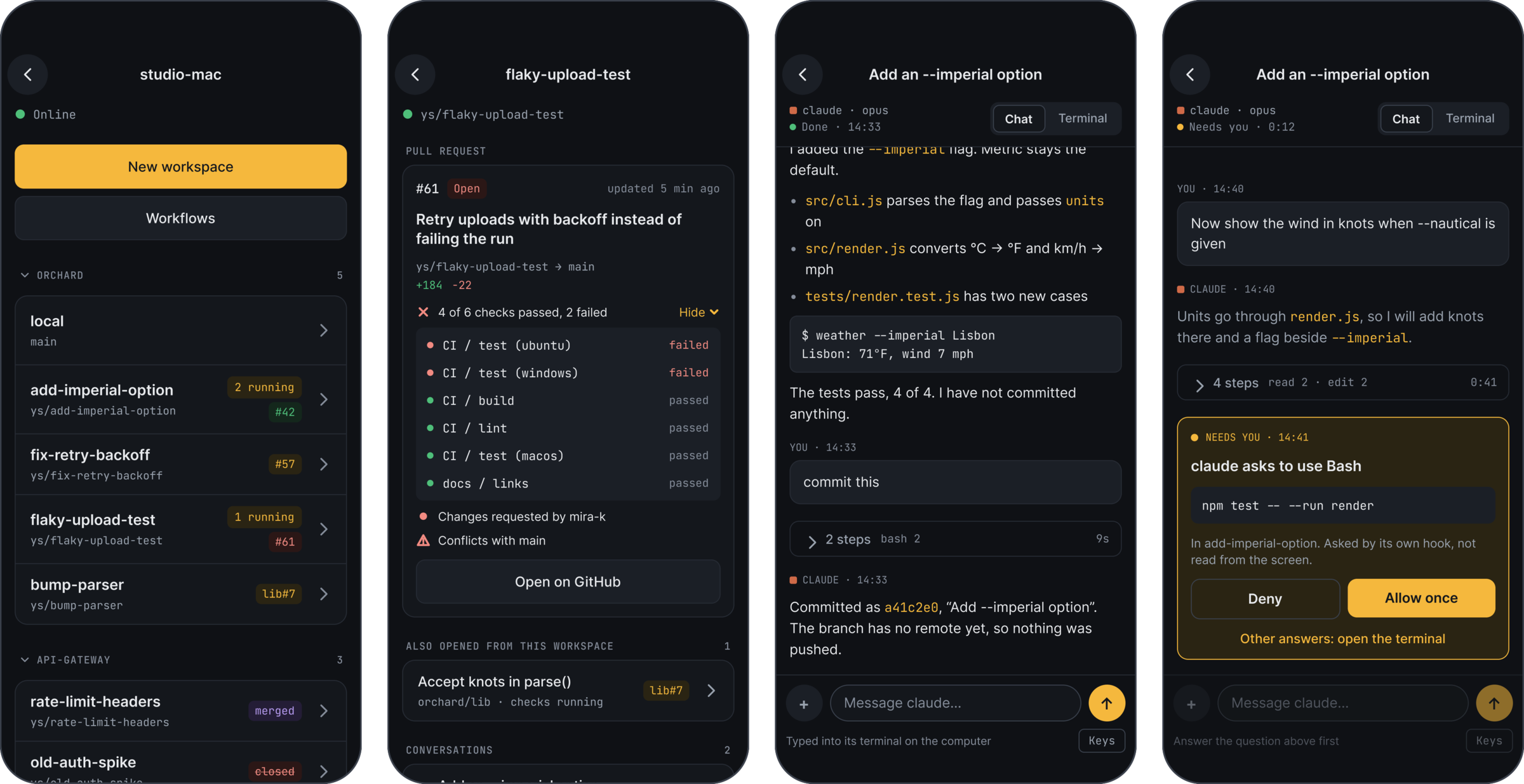
Yardsort on your phone reaches the agents on your computer. See what each workspace is doing, read a conversation, answer what an agent asks, and start new work, away from your desk. The agents run on the computer, not on the phone, so they keep going whatever happens to the connection.
What you can do with it
- See a computer's workspaces. Each project with its workspaces, their branches, how many agents are running and each one's pull request. A project folds to put its workspaces away. See A computer's workspaces.
- Read a conversation as a chat. What you asked, the agent's steps folded to one line, and what it wrote back, in one column at the phone's width. Type a message, stop the agent, or give it a picture. Terminal shows the terminal itself. See Chat on the phone.
- Answer a permission question. When Claude Code asks to run a command, the chat shows it with Allow once and Deny. See When an agent asks for a permission.
- Let a smoke test run. A test that waits for your approval shows its steps, with Run and Don't run. See When a smoke test waits for you.
- Follow pull requests. A badge on each workspace, a card with the checks by name and the review, and a list of the open, merged and closed ones over every project. Read-only. See Pull requests on the phone.
- Start work. A new workspace, another agent in one you have, or a conversation that ended, resumed. See Starting work from the phone.
- See what waits, in one list. The bell opens Notifications: what needs you and what finished while you were not looking, on every computer the phone can reach. A computer's row says how many, and its workspaces are marked. Opening a finished row marks it seen on the computer too. See Notifications.
- Be told when something needs you. A task that moved, a review, a failed run, an agent or a workflow waiting for an answer, or an agent that finished while nobody looked. The notification opens that item. See Notifications.
- Export your account. Settings → Your account saves everything the server keeps of it as a file, never a credential. See Exporting your account.
- Delete your account. Settings → Your account → Delete my account removes everything the server keeps of it, for every device, after you type delete and sign in again. Nothing on your computers is deleted. See Deleting your account.
What it needs
- Yardsort on your computer, with Remote on. Remote is off until you turn it on in Settings → Remote, where you sign in to a Yardsort server. See Turning it on.
- The app on your phone, signed in to the same server.
- A yes at the computer. Pair a device on the computer shows a code. Enter it on the phone, then say yes at the computer and choose whether the phone may only watch or also type, and which projects it reaches. See Letting a device in.
The phone reaches your computer through that server. Whoever runs the server can see what passes through it, so use one you run yourself or one run by someone you trust with that: see What the server can see.
A Linux server with no screen can be the computer your phone reaches too: see A computer with no screen.
Where to get it
Not in the app stores yet. It is invite only while a small group tries it, and it will be in the stores in a few weeks. Write to us if you would like to try it early.
The app is open source, like the rest of Yardsort. Its code is in
apps/mobile, under the MPL-2.0.