
Terminals & sessions
The middle of the window is a real terminal. Agents run in it exactly as they do anywhere else — Yardsort does not re-implement their interface or read their output.
Tabs
Each workspace has its own row of tabs.
- The agent buttons on the right of the tab bar start that agent in this workspace, with no prompt. Each carries that agent's mark, which a tab running a conversation wears too, so a row of tabs says at a glance which agent is in which. (To start one with a prompt and a fresh branch, use the composer.)
- Hand off…, before them, starts another agent here with what Yardsort recorded about the workspace as its first message — see below.
- + or
Ctrl+Shift+T/⌘Topens a shell in the workspace folder — for running tests, a dev server, or git by hand, next to the agent. - × or
Ctrl+Shift+W/⌘Wcloses a tab and stops what runs in it.
Clicking a workspace that has nothing running — and no earlier conversations — opens a shell there, so choosing a workspace always lands you somewhere useful.
Terminals keep running when you look elsewhere. Switch workspaces or tabs freely; when you come back the screen is repainted exactly as it was, scrollback included.
A workflow can start an agent too. It opens as a new tab in its workspace, and the tab you were looking at stays in front.
A smoke test run opens as a tab in the same strip, after the
terminals, named after the test with a dot for how the run is going. It shows the run's steps and
their output rather than a terminal; the terminal behind it keeps running, and Mod+W closes the
tab without touching the run.
Copy, paste, links
| Linux / Windows | macOS | |
|---|---|---|
| Copy the selection | Ctrl+Shift+C, Ctrl+Insert, or Ctrl+C (see below) | ⌘C |
| Paste | Ctrl+Shift+V or Shift+Insert | ⌘V |
| Open a link | Ctrl+click | ⌘+click |
Right-click the terminal for Copy, Paste and Select all. A program that reads
the mouse itself, like an agent's interface or vim, gets the right-click instead. Hold Shift
to open the menu anyway, the same way Shift+drag still selects text in such a program.
On Linux and Windows, plain Ctrl+C copies while text is selected and clears the
selection, so pressing it again interrupts the program. With nothing selected it is the
interrupt, as always. This means a desktop that sends Ctrl+C for its own copy key, such as
Omarchy's Super+C, copies from Yardsort too.
Plain Ctrl+V always goes to the program. vim uses it for block selection, and agents
read it to paste an image. On Omarchy that means Super+V (which sends Ctrl+V) does not paste
into a shell. Use Ctrl+Shift+V or the right-click menu, or tag Yardsort as a terminal in your
Hyprland configuration. Omarchy then sends Ctrl+Shift+C and Ctrl+Shift+V, but Super+C
stops copying in Yardsort's text fields:
o.window("yardsort", { tag = "+terminal" })
A plain click belongs to the program too. See Keyboard shortcuts for why.
Typing to an agent
Shift+Enteradds a line to the message you are writing, in Claude Code, Codex, Grok and OpenCode alike — the same as in kitty, Ghostty or foot. The key is sent in the encoding those terminals use, and only to a program that reads it: an agent, or anything else that asks the terminal for it. A shell at its prompt gets a plainEnter, as before.- Drop a file on the terminal to give the agent its path. The terminal is outlined while you hover; on release the path lands at the cursor, quoted for the shell if it needs it, with a space after it so you can keep typing. Drop several and you get all of them. It is a paste, so it goes to whatever program is in the tab — a shell gets an argument it can use as it is. To put a path in the first message, before anything is running, drop the file on the composer instead.
When an agent's context fills up
Once a Claude Code or Codex conversation has used 80 % of its context window, a bar appears
above its terminal: Context 84% full — 168,000 of 200,000 tokens. Compact types the agent's
own /compact command into the tab and presses Enter, which has the agent summarise the
conversation so far and carry on with room to spare. It types into the agent's prompt as it
stands, so clear anything you have half-written first, or it is sent along with /compact.
While the agent is working on a turn the button is greyed out; it would only queue the command.
Not now hides the bar until the context
reaches the next step (90 %, then 95 %); after a compaction, or anything else that shrinks the
context, the next climb past 80 % shows it again. Compacting is always the agent's own work, so
the bar only offers it. Some agents compact by themselves when they run out, too.
The numbers come from what the agent records about its own requests, never from the terminal. So the bar needs the agent's reporting switched on: Capture what Claude Code reports or Capture what Codex reports in Settings → General (see Activity). It updates when a turn ends, not while one runs.
- Codex states its window in its session file, so its share is exact.
- Claude Code does not say how large its window is. Yardsort takes the usual 200,000 tokens,
or 1,000,000 for a model chosen with
[1m]— on the workspace (opus[1m]), inANTHROPIC_MODEL, or asmodelin Claude Code's settings (the project's.claude/files, then~/.claude/settings.json). A context already past 200,000 tokens is taken as a 1M window. If you pick a 1M model some other way —/modelinside the session, say — the bar can show early; press Not now.
Handing work to another agent
One agent has worked in a workspace and you want a second one there: Codex after Claude, or the same agent again from a clean start. The second agent sees the same files and the same diff, but nothing of what was asked, tried or found. Hand off… in the tab bar writes it a first message from what Yardsort recorded and opens the composer with it, to run in this workspace. Read it, change it, pick the agent, press Enter.
The message has these parts:
- What this workspace was asked — the first message of each conversation here, whole.
- Where the work stands — the branch and what it started from, the commits on it, and each changed file with the same word the Changes list gives it: reported written by an agent, written while one ran a command, or no report.
- What the agents did here — one entry per run: which agent, when, how long, how it ended; then, for a run that was reporting, its turns, tools by count, what failed and on which file, what it reported writing, permissions asked, notifications raised. A run that was not reporting says only that it ran.
- What was said — only in a project that
shares its agents' conversations: every message you
typed in this workspace's conversations and each turn's final reply, newest first, read from
the agents' own transcripts as the message is made. About 16,000 characters of it: the newest
turns whole, older ones shortened, and the rest counted, with the
ys workspace contextline that shows one. - What is not here — what the message could not say: the conversations themselves, or with
What was said, the agents' reasoning, their tool calls and what those returned; the
commands; the contents of files as they were; and how many events the summary rests on, with
the
ys activity listline that shows them.
Two things to know. Without What was said, nothing in it comes from the last agent's words: Yardsort keeps metadata, never a conversation, so the message says where it is blind and tells the agent to ask you. With it, the words are read from the agents' files when you press Hand off…, and Yardsort keeps no copy. And a handoff is not the task: the new conversation's record keeps no first message, so what the workspace was asked stays what you first typed — for Assist, and for the next handoff. Times in the message are UTC, in case it travels.
With Assist reviewing changes, the changed files come in the order Assist would look at them — what the task asks for first, then what supports it, then what it could not place, then what looks unrelated — each with its word: on task, supports the task, looks unrelated to the task, and any flag (may add a secret, weakens a test, a substantive change no agent accounted for…). It is the same review the Changes list's badges come from, so nothing new is sent, and the message says it is a judgment, not a fact. Without Assist the files are in git's order and nothing of the kind appears.
When the project shares its memory, the message carries it too, under Project memory, where you can edit it with the rest.
ys workspace handoff <workspace> prints the same message from the command line, without
Assist's ordering — see the CLI guide.
A handoff keeps the next agent in this workspace, on this branch. To start new work that builds on this one in a worktree of its own, fork the workspace instead: Fork into new workspace… in the workspace menu makes a new branch from this one's and sends the same record after your message — see Fork into new workspace….
What agents can read of each other
The handoff message says what the agents did. It does not say what they were told or what they concluded — what you would otherwise type again for the next agent. With Share conversations between this project's agents ticked in the project's Memory view, any agent in a workspace can read that too:
ys workspace context
prints the workspace's other conversations: every message you typed, and each agent's reply at
the end of each turn, newest first, with the time of each turn in UTC. Yardsort reads them from the
agents' own transcripts — the files Claude Code and Codex keep of every conversation — when the
command is run, and keeps no copy: nothing of it is stored, and when the workspace goes, Yardsort
has no way back to them. Tool calls, their output and the agents' reasoning are left out, so a
conversation of hundreds of megabytes reads as a few pages; what still does not fit is named by
turn, and --turn shows any one whole. See the CLI guide.
Some things to know:
- It is on unless you turn it off, per project, in the project's Memory view. What an agent reads goes to that agent's provider: Claude's conversation, read by Codex, is sent to OpenAI as part of Codex's work. Turn it off in projects where that is not fine.
- A new agent is told. An agent started in a workspace where another conversation has said
something gets a short note: which conversations there are, and that
ys workspace contextreads them. It says nothing of what was said — the agent reads that when it needs it, so it is current then. Its tab says so: a line under the tabs for its first minute, Told about claude's conversation, and a ⇄ mark on the tab after; Show opens the note and what the command gives now. - How the note travels depends on the agent. Claude Code, Codex, Grok, OMP and pi take it as background context — their system-prompt option, the Context args in Settings → Harnesses — so an agent started from an agent button gets it without a first message and starts no turn. An agent without that option can only be told in a first message: its button asks first, Start with the handoff… (the composer, with that agent picked and the handoff message) or Start fresh (not told). From the composer the note goes after your message, under This workspace's other conversations, and the task on record stays your words; the composer says so beside its pickers, with Show and a box to leave it out of that start. Workflow steps are told the same way.
- Alt-click an agent button to start it without the note.
- Resuming tells Claude Code, OMP and pi again. A resumed or forked conversation of theirs is
given the note as a new one is, about every other conversation here, and its tab says so. OMP
and pi build their system prompt at each launch. Claude Code keeps the one a conversation began
with, so a resume that is told passes
--system-prompt-snapshot offto have it built afresh; a resume with nothing to tell is left as it was. Codex and Grok keep the system prompt a conversation began with whatever they are passed, so they are not given it: a resumed one knows what it was told when it began, and one that began alone is not told about conversations started since. Ask it to runys workspace context. - Claude Code, Codex, Grok, Cursor, OpenCode, OMP and pi — every built-in agent — are read
today. A custom agent's conversations are listed with why they are not there, and so is one
whose transcript is not found. Agents write nothing down until they are asked something, so
one started without a message and not found is said to be one that most likely has nothing
said in it yet. Claude Code's,
Grok's and pi's are found by the session id Yardsort gave them; Grok's under
~/.grok/sessions(orGROK_HOME), timed by the turns in its own event log. The others are found by the id the agent reported when it reports what it does, and otherwise by the folder and the time the conversation first began; a resume does not change which one that is:- Codex — its session file under
~/.codex/sessions(orCODEX_HOME). - Cursor — its chat under
~/.cursor/projects/<the workspace's path>/agent-transcripts. Cursor writes the time of each message only to the minute. - OpenCode — its session in OpenCode's database,
~/.local/share/opencode/opencode.db(or underXDG_DATA_HOME). A subagent's session is part of the conversation that started it, and is not read as one of its own. - OMP — its session file under
~/.omp/agent/sessions(pi's under~/.pi/agent/sessions; both underPI_CODING_AGENT_DIRwhen it is set). These files are trees: when you go back and take the conversation another way, what is read is the way it went last.
- Codex — its session file under
- The asking agent's own conversation is left out, and so is what Yardsort added to a first message — the project's memory, a handoff or fork packet — which the agent has anyway.
- A fork shows only its own turns: the ones before the fork belong to the conversation it came from, which is listed beside it.
Agents keep working when you close the window
Terminals do not belong to the window. They belong to a small background process — the daemon — that Yardsort starts the first time it needs one and talks to over a private local socket. Closing Yardsort is a disconnect, not a kill: whatever your agents were doing, they carry on doing. So is Yardsort crashing, or being killed.
Open it again and it finds that daemon, reattaches, and repaints every terminal from where it got to. Conversations that never stopped are still running — they are not listed as interrupted, because nothing interrupted them. Any agent that is waiting for you wears the ringed dot, so you can see at a glance what wants reading.
Because leaving processes behind is not something to discover by accident, closing with agents still working asks first. The dialog names them and offers three answers:
- Leave them running — close; they carry on and are waiting next time. This is the default.
- Stop them — stop every agent, and the daemon with them.
- Cancel — stay where you are.
Nothing is stopped unless you say so. A shell sitting at a prompt is not counted as work, so a window with only shells in it simply closes.
The daemon shuts itself down once there is nothing left to look after: no window open and no
agent running. There is one per profile (see YARDSORT_DATA_DIR in
Settings), and the status bar shows its process id.
To go back to the old behaviour — terminals inside Yardsort, stopping when it does — start it
with YARDSORT_NO_DAEMON=1.
Status dots
The dot on a tab, and the one on each workspace in the sidebar, tell you what is going on without opening anything:
| Dot | Meaning |
|---|---|
| pulsing | printing right now — an agent at work |
| solid | running but quiet for a few seconds — most likely waiting for you |
| ringed | an agent is waiting and you have not looked at it yet — it finished a long stretch of work, or it was already waiting when you opened Yardsort |
| grey | nothing running |
| red (tabs) | the program exited with an error |
This comes purely from terminal activity. Agents animate a spinner while they think, so for them silence really does mean "your turn".
The badge on a workspace row
The dot says whether something is running; the badge at the right of a workspace row in the sidebar says what its agents have got to, so you do not have to open a workspace to find out:
| Badge | Meaning |
|---|---|
| 1, 2, … | that many agents are running but quiet — your turn. Filled in solid if they finished while you were elsewhere and you have not looked yet |
| ✓ | every agent here has ended, cleanly |
| nothing | they are all working — the pulsing dot already says so, and a row that lights up only when it wants something is worth glancing at |
| ✗ | one of them exited with an error |
Shells are not counted. A prompt sitting there is not news, and a workspace whose agent has finished should not look busy because a shell is still open beside it.
Notifications
When an agent has been busy for a while (eight seconds or more), goes quiet, and Yardsort is not the window you are looking at, you get a desktop notification: "claude is waiting — project / workspace". Shells never notify, and neither does anything you are watching.
Turn it off in Settings → General. That switch is for agents going quiet
only: a workflow's notify step always shows its notification, because you wrote it to.
Sessions: resume and fork
Agents save their conversations on disk. Yardsort keeps a record of each one — which agent, which conversation, your first message as its title — so you can return to it after the process is gone: because you closed the tab, the agent exited, or you chose to stop it on quitting.
Resume
Same conversation, new process.
- A workspace with nothing running lists its previous sessions. Press Resume on one.
- A tab whose agent has ended shows a bar with Resume; the dead terminal is replaced.
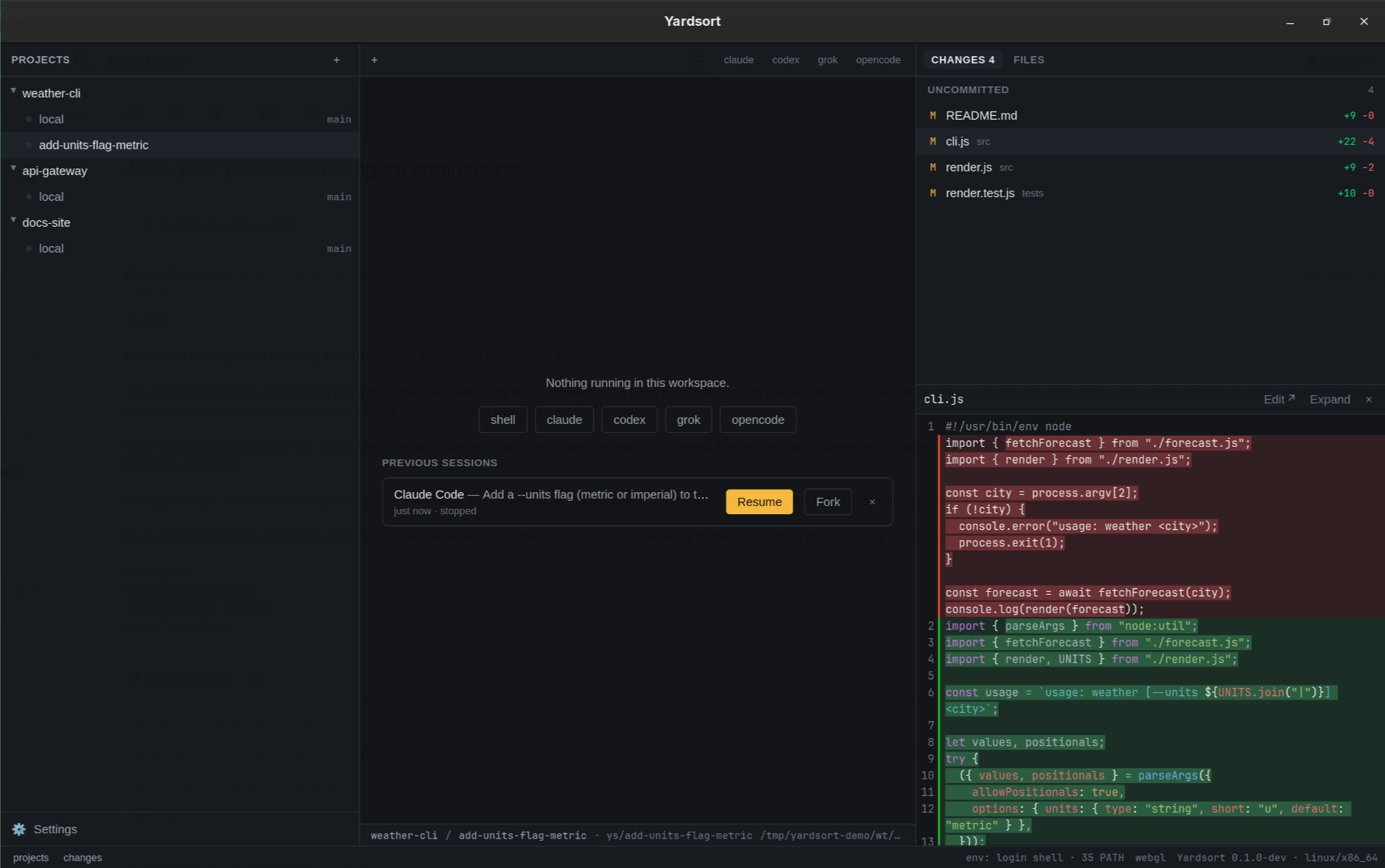
Sessions labelled interrupted ended without saying so — Yardsort was killed, or the machine went down. They resume like any other. An agent that simply kept working while Yardsort was closed is not interrupted and needs no resuming: it is still running, and comes back by itself. One that finished while Yardsort was closed is listed as ended with its exit code, not as interrupted: the background process keeps the exit for the next time something connects — see Activity.
Fork
A copy of the conversation that goes its own way, in a new tab. The original is untouched. Use it to try a different approach without losing the first. You can fork an ended session from the list or the bar, and a running one by right-clicking its tab.
Forget
× on a previous session removes it from Yardsort's list. The agent's own saved conversation is not touched.
What can be resumed
| Agent | Resume / fork |
|---|---|
| Claude Code, Grok, Pi | Any recorded session. Yardsort chooses the conversation's id up front, so it can always name it. |
| Codex, OpenCode | The most recent conversation in the workspace. These agents choose their own ids, and "continue the latest one here" is the only handle they offer. Older entries say so rather than offering a button that would open the wrong conversation. |
OMP and Cursor can Resume the most recent conversation in the workspace, but their built-in definitions do not offer Fork. Pi supports both actions by session id.
If a session cannot be continued — its agent was disabled or removed in settings, for example — the list says why.