
Keyboard shortcuts
Open Shortcuts in the bottom bar, or Settings → Keyboard, for the in-app cheat sheet and binding editor.
Mod is ⌘ on macOS and Ctrl+Shift on Linux and Windows.
| Shortcut | Linux / Windows | macOS | Action |
|---|---|---|---|
| Mod+K | Ctrl+Shift+K | ⌘K | Search commands and workspaces |
| Mod+/ | Ctrl+Shift+/ | ⌘/ | Shortcut cheat sheet and configuration |
| Mod+L | Ctrl+Shift+L | ⌘L | Focus projects (expands the panel) |
| Mod+E | Ctrl+Shift+E | ⌘E | Focus the workspace or active terminal |
| Mod+R | Ctrl+Shift+R | ⌘R | Focus changes and files (expands panel) |
| Mod+↑ / Mod+↓ | Ctrl+Shift+↑ / ↓ | ⌘↑ / ⌘↓ | Previous / next usable workspace |
| Mod+← / Mod+→ | Ctrl+Shift+← / → | ⌘← / ⌘→ | Previous / next terminal tab |
| Mod+O | Ctrl+Shift+O | ⌘O | Open a project (folder picker) |
| Mod+N | Ctrl+Shift+N | ⌘N | New workspace in the current project |
| Mod+T | Ctrl+Shift+T | ⌘T | New shell tab in the selected workspace |
| Mod+W | Ctrl+Shift+W | ⌘W | Close the active tab — a terminal, or a smoke test run's tab in front of it |
| Mod+B | Ctrl+Shift+B | ⌘B | Toggle the left panel |
| Mod+Alt+B | Ctrl+Shift+Alt+B | ⌥⌘B | Toggle the right panel |
| Mod+, | Ctrl+Shift+, | ⌘, | Settings |
| Mod+C / Mod+V | Ctrl+Shift+C / V | ⌘C / ⌘V | Copy the selection / paste, in a terminal (more ways) |
On a smoke test's approval card, while it has the keyboard:
Mod+Enter runs, Esc refuses.
In the composer: Enter starts, Shift+Enter adds a line, Esc cancels. Esc also closes
dialogs and menus. In an agent's terminal Shift+Enter adds a line too — see
Typing to an agent.
Navigate without the mouse
Commands in the bottom bar or Mod+K opens a searchable palette of commands and workspaces. Type to filter, use ↑ / ↓ to select and Enter to run; Escape closes it. Commands that do not apply to the current workspace are disabled. Some commands have no key until you give them one — Pull requests, Tasks, Usage, Start from a link… and the welcome tour among them — and are always here. Workspace navigation follows project order, wraps at either end, and skips archived or missing workspaces and missing projects. Opening a worktree follows the same behavior as clicking its row, including opening a shell when it has no terminal or conversation to return to.
Use Mod+L, Mod+E and Mod+R to reach the three panels. Tab / Shift+Tab moves between controls, and Enter or Space activates buttons. In the project and file trees, ↑ / ↓ moves between rows, → expands, ← collapses or goes to the parent, and Home / End jumps to the ends. Tab reaches the action buttons beside a project or workspace. On a terminal tab, Shift+F10 (or the keyboard's context-menu key) opens its menu. Settings tabs support ← / → and Home / End.
Dialogs keep keyboard focus inside them and return it when closed. Global app shortcuts pause while a dialog or menu is open, including during shortcut recording. Plain terminal keys remain with the running program. Modified arrows in text fields (including the composer, commit message, search inputs and editable code) keep their normal caret movement and selection behavior. They do not switch workspaces or terminals while you edit. Other shortcuts, including Mod+K, remain available in text fields. A focused terminal still uses Mod+arrows for app navigation. Disabled commands leave their keys unconsumed.
Customize bindings
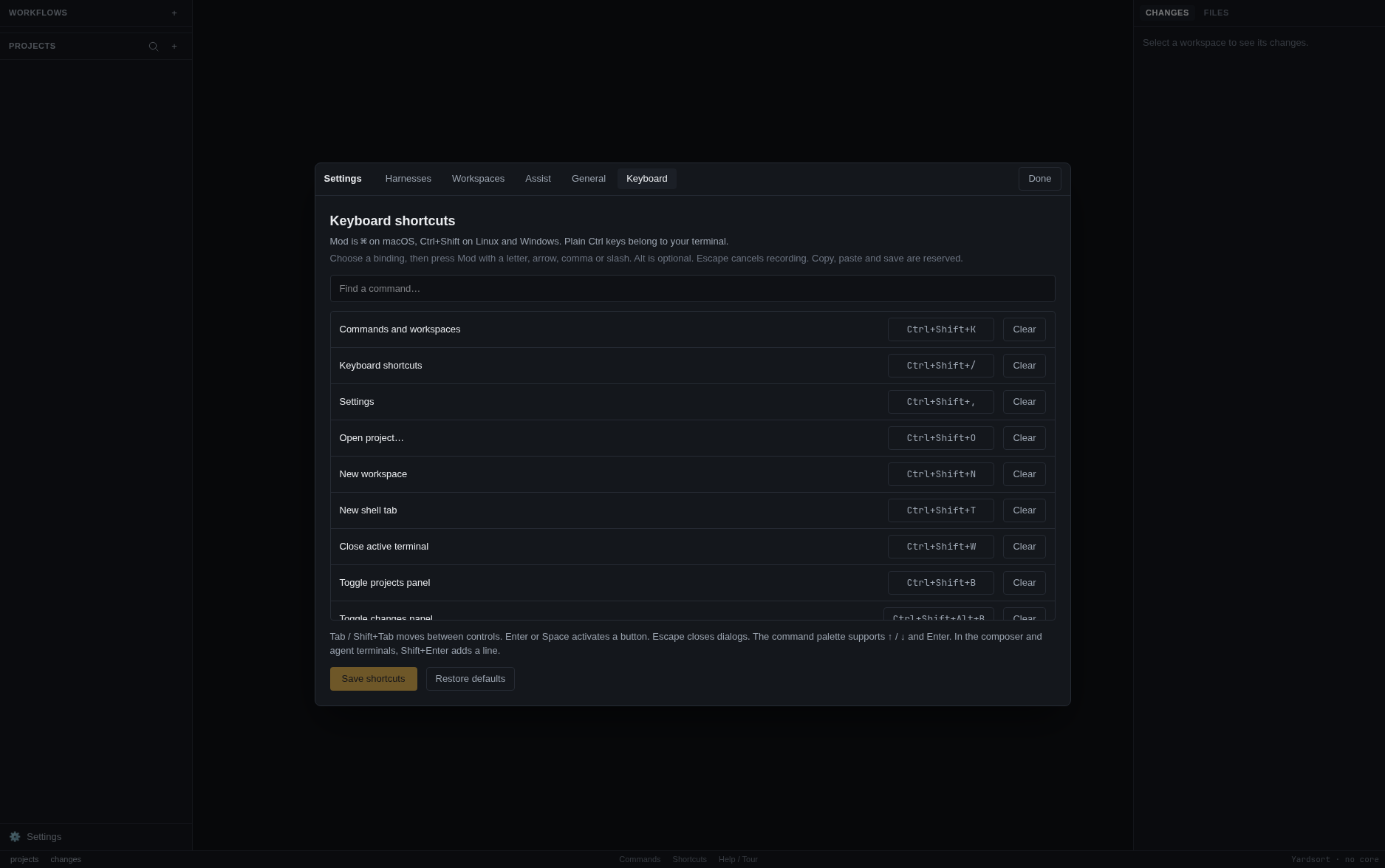
In Settings → Keyboard, filter the command list, select a binding and press the new combination. Use Mod with a letter, arrow, comma or slash; Alt is optional. Escape cancels recording. Clear leaves an action unassigned; it stays available through the command palette. Duplicate bindings are explained and cannot be saved. C, V and S are reserved for copy, paste and file saving. Terminal/composer keys such as Shift+Enter are fixed.
Press Save shortcuts to apply changes. Restore defaults prepares the standard bindings; press Save to apply those too. Bindings are saved in the profile's SQLite UI state and survive restarts. If saving fails, the previous bindings remain active and the error is shown. Button hints and the palette reflect saved bindings. The bottom-bar Shortcuts button remains available if you clear the shortcut that opens this screen.
Saved bindings take precedence over defaults added by a newer version. If a new default conflicts with your shortcut, the new command stays unassigned and remains in the palette. Keyboard settings explains any recovered bindings: invalid individual entries use an available default; duplicate saved entries keep the first command in the cheat sheet and leave the later one unassigned. Unrelated custom bindings and explicitly cleared bindings are preserved. If the saved data cannot be read as a command map, defaults are used with a notice. Review and press Save shortcuts to keep recovered bindings and clear the notice; loading never overwrites the stored data automatically.
Why Ctrl+Shift?
Because plain Ctrl+letter belongs to the program in the terminal. Ctrl+B moves back a
character in a shell and is the tmux prefix; Ctrl+W deletes a word; Ctrl+T transposes;
Ctrl+C interrupts. An app that takes those away makes its terminal worse than a real one.
Ctrl+Shift is what terminal emulators have always used for their own commands, so Yardsort
does too. On macOS ⌘ never reaches the terminal, so it is free to use.
Shortcuts follow the character your keyboard layout produces, not the physical key, so they match the key caps on Dvorak, AZERTY and friends.