Triggers
A trigger starts a workflow or a smoke test when something happens
in a workspace, instead of when you press Run or a schedule's time comes: an
agent says its work is done, an agent finishes a turn or exits, a smoke test or a workflow run ends,
something happens on the workspace's pull request — it opens, a review or a comment comes in, its
checks fail — or something you name happens, which an agent, a smoke test or a script says with
ys event emit. What it starts is an ordinary run, in that workspace, with the
inputs you gave the trigger.
For example: when someone reviews the pull request of fix-login, tell its agent to address the
review. Or: when the agent says it is done, have a second agent review the branch.
Triggers in the sidebar, under Schedules, lists every trigger of every project; the
composer offers the ready-made ones for each new workspace; and
ys trigger does all of it from a terminal. The runs show in the workflow's runs and in
Tests like any other, marked triggered with the trigger's name.
Three things to know before you make one:
- Triggers fire while Yardsort is open. What happened while it was closed — an agent that ran
ys workspace doneorys event emit, a run that ended, a turn its agent reported, a review posted — is found when it next opens, and acted on once. - Only what happens after you make it counts. A trigger never fires for something that happened before it was saved, or while it was switched off.
- A trigger approves nothing. A smoke test file nobody has approved waits for you, as it does when an agent runs it. See Smoke tests and approval.
Ready-made triggers
Five triggers come ready made, each an event and a built-in workflow, with at most one question:
| Preset | When | Runs | Asks for |
|---|---|---|---|
address-reviews | Someone other than you reviews or comments on the pull request, 2 min quiet | address-review | |
fix-checks | The checks on the pull request's newest commit fail | fix-checks | |
review-when-opened | The pull request opens, or a draft is marked ready | code-review | reviewer: who reviews |
review-when-done | The agent says its work is done | review-branch | reviewer: who reviews |
smoke-when-done | The agent says its work is done | smoke-then-tell | suite: which smoke test |
In the composer, under the message, each preset has a box to tick, with its one question beside
it: ☐ Review when the work is done, by [Codex ▾]. Each one ticked becomes a trigger on the new
workspace before its agent starts, so an agent whose workspace listens for
ys workspace done is told about it in its first message. The composer
remembers, per project, which were ticked last time and their answers. Smoke test when the work is
done offers the smoke tests in the project's own checkout, and cannot be ticked in a project that
has none. While those tests are still being read, a ticked one says so and Start waits, so it is
never left out unasked. A preset that cannot be added — its test is not on the new branch, say — is
said once the workspace has started; the workspace and its agent start all the same.
In the trigger dialog, Start from fills the dialog in from a preset, to change before saving. Left without a name, the trigger is called what the preset is.
ys trigger presets
ys trigger add --preset address-reviews --workspace fix-login
ys trigger add --preset review-when-done --input reviewer=codex --workspace fix-login
A trigger made from one is an ordinary trigger: its quiet time, cap, name and when you are told change as they would any other's.
Making a trigger
New trigger… at the top of the Triggers view opens the trigger dialog. Triggers… in a workspace's ⋯ menu opens the view on that workspace's triggers, and in an agent tab's menu on that agent's own; a new trigger made there starts on it. Show all goes back to every trigger.
The dialog asks its questions in the order they can be answered:
- Where: the workspace, and whether the trigger listens to any agent in it or only to one (see One agent's trigger).
- When: the events, in four groups — the agent, a run, the pull request, something you name — then the filters of the ones ticked. A trigger is about one kind of thing — an agent, the pull request, or the workspace — so events about another are greyed out once one is ticked; make a second trigger for those. A custom event asks for the names it listens for, and offers the ones the project's other triggers use.
- Run: a workflow or a smoke test, then its inputs, asked as Run… asks them.
- Quiet time, At most (the cap) and Tell me, then an optional name.
As it is filled in, it says what will happen in words: When someone other than you reviews or
comments on this workspace's pull request, 2 minutes after the last one, tell the agent to address
it. At most 3 times per pull request. Add trigger checks everything a run would be refused
for, as ys trigger add does, and says what is wrong without closing.
From a terminal:
ys trigger add --on pr.review --on pr.comment --workflow address-review --workspace fix-login
ys trigger add --on workspace.done --workflow smoke-then-tell --input suite=login --workspace fix-login
ys trigger add --on agent.exited --failed-exit --workflow tell-me --workspace fix-login
ys trigger add --on test.finished --of-test login --verdict failed --workflow fix-it
ys trigger add --on custom.migration-written --test migrations --workspace fix-login
--on says what to listen for; give it more than once for more than one event. --workflow or
--test says what to run, and --input id=value gives each of its inputs. --workspace takes a
workspace's name or id, and can be left out inside a workspace's folder or in an agent's terminal
there. Everything a run would be refused for is checked before anything is written: the workspace
is there and not archived, the workflow or the test is there and ready, its inputs fit, and the
filters are ones the events have.
| Option | What it is |
|---|---|
--preset | A ready-made trigger, in place of --on and what to run |
--on | An event, below. More than once for more than one |
--workflow | Run this workflow, or |
--test | run this smoke test, from the workspace's .yardsort/tests |
--workspace | Where. Default: the workspace this is run in |
--session | Only this agent session's events, by its id or the start of it. See One agent's trigger |
--input | id=value, for each of the target's inputs |
--name | What lists call it. Default: the workflow's or the test's own name |
--quiet | Wait this long after the last event before starting the run: 30s, 2m. Default: 2m for reviews and comments, else none |
--cap | Runs it may start for one agent session, one pull request, or the workspace, before it stops. Default: 3 |
--notify | failure (the default), always or never: when to be told how a run ended |
What it listens for
| Event | Happens when | Filters |
|---|---|---|
workspace.done | An agent ran ys workspace done | |
agent.settled | An agent finished a turn: it went quiet after real work, or its harness said so | --new-commits, --clean |
agent.exited | An agent's program ended | --failed-exit |
test.finished | A smoke test run in the workspace reached a verdict, or could not | --of-test <id>, --verdict passed or failed |
workflow.finished | A workflow run in the workspace ended | --of-workflow <id>, --outcome succeeded or failed |
pr.opened | The workspace's branch has an open pull request it did not have before | --drafts |
pr.review | A review was submitted on the workspace's pull request | --from, --state, --no-bots |
pr.comment | A comment on its conversation, or a reply on a review thread | --from, --no-bots |
pr.checks_failed | Its checks finished on its newest commit, and one failed | |
pr.checks_passed | Its checks finished on its newest commit, and none failed | |
pr.conflicted | GitHub says it conflicts with its base | |
pr.merged | It was merged | |
pr.closed | It was closed without being merged | |
custom.<name> | Someone ran ys event emit <name> in the workspace |
- An agent's events are about the agents you started in the workspace. A shell is not an agent, and neither is an agent a workflow run started: the reviewer of a code review finishing its turn sets nothing off. An agent's events, the pull request's and the workspace's cannot share one trigger, since each counts its runs for something different; make two.
agent.settledfires at every turn, including a turn where the agent stops to ask you something. That is what "tell me each time it stops" wants, and not what "it is finished" means.--new-commitswaits for the branch to have commits it did not have the last time this trigger started a run for that agent, or, the first time, commits its base branch does not have.--cleanwaits for nothing to be uncommitted. Both are looked at when the run would start, after the quiet time. For "the work is done",workspace.doneis the surer one.--failed-exitis a code that is not 0, a program that was stopped, or one that ended without Yardsort hearing how.--verdict failedincludes a run that could not finish;--outcome failedincludes a cancelled run.- The pull request's events are about the open pull request for the branch the workspace has
checked out, on GitHub, as
ghsees it. See Watching a pull request.
Watching a pull request
While an enabled trigger in a workspace listens for a pr.* event, Yardsort looks at that
workspace's pull request once a minute, with gh, and starts what the trigger starts when
something changed since the last look. Nothing is asked of GitHub for a workspace no trigger
watches.
- What is there when you add the trigger is not news. Adding it reads the pull request as it
is: a pull request already open is not
pr.opened, checks already red are notpr.checks_failed, and a review already posted is notpr.review.ys trigger addsays which pull request it is watching, or that there is none yet. - Reviews and comments count when they are someone else's. You and every agent post to GitHub
as your
ghaccount, and the agent answering a review answers each comment as you. So by default only posts from other accounts count — a teammate, a review bot.--from anyonecounts yours too, except what is posted while a run this trigger started is going, which is the agent's own answers.--no-botsleaves out accounts whose name ends in[bot].--state(approved,changes_requested,commented) narrowspr.reviewto reviews that concluded that. - A reply on a review thread is a comment. GitHub also records each reply as a review of its
own; Yardsort counts it once, as
pr.comment. A review is the review's verdict and words with the comments on lines made in it. - Reviews and comments come in bursts, so a trigger on them waits two minutes after the last one by default and starts one run for all of them.
- Checks are told once they have all finished:
pr.checks_failedwhen nothing is running and something failed,pr.checks_passedwhen nothing is running and nothing failed. Every check on the commit is counted, however many there are, and one GitHub has marked stale counts as finished. Each is told once per commit, so a push that fails again is news again. - A draft is
pr.openedwhen it is marked ready for review.--draftscounts it as soon as it opens instead. pr.mergedandpr.closedare told once. A different pull request opened on the branch afterwards ispr.opened, and counts its own runs; the same one reopened is not new, and what was already on it is not news again. A workflow that needs the open pull request —{{ pr.* }},wait_pr_activity— cannot run on these, and saving says to use{{ event.url }},{{ event.number }}and{{ event.title }}instead.- GitHub not answering — no network,
ghlogged out — is no news; the trigger looks again a minute later.
The done signal
ys workspace done
ys workspace done --note "Login validates on blur; tests added."
ys workspace done, run in an agent's terminal, says the work in that workspace is committed and
ready to be looked at. A trigger on workspace.done starts what it starts. The note, if there is
one, is there for the workflow as {{ event.note }}, and the commit the worktree was on as
{{ event.head }}. Outside an agent's terminal, run it in the workspace's folder or give
--workspace. It prints whether a trigger there listens for it.
An agent is told about it in its first message — a short section after the project's memory
and the smoke tests — when a trigger in its workspace listens for workspace.done at the moment
it starts. It is asked to run it once its work is committed, and not to pause or to ask a
question. An agent that was already running when you added the trigger was not told; ys trigger add says so, and the trigger dialog offers Tell the agent: it types the same paragraph into
each of them, once it is quiet, never into one that is working. Agents started from then on are
told when they start.
Yardsort reads nothing an agent prints to know it is done: the agent runs a command, as it runs
git or gh.
Custom events
ys event emit migration-written
ys event emit migration-written --note "0042 adds users.last_seen"
A custom event is for what no event above covers: a milestone of your own, said in your own
words. ys event emit <name> raises it in the workspace it is run in, and a trigger there on
custom.<name> starts what it starts. It can come from:
- An agent, when its instructions say to run it — your
AGENTS.md, the first message, or the message a workflow sends it. Yardsort tells an agent aboutys workspace done, but not about your own events: it cannot know when yours should be raised. - A smoke test's
runstep, as a command like any other. A run a trigger on it starts counts as one step further along a chain, as the end of a run does, so tests that raise each other's events stop (see Chains). - A script, a git hook, or you, in the workspace's folder, or anywhere with
--workspace.
A name is lowercase letters, digits, - and _, starting with a letter or a digit, up to 40
characters; ys event emit custom.migration-written is taken too. Nothing has to be declared
first. Instead, ys event emit says whether a trigger there listens for that name, and when none
does, which names they do listen for, so a typo shows at once. One trigger can listen for more
than one name, with --on once for each. Each name is gathered on its own: two different names
raised together start two runs, one after the other, each with its own name and note, while the
same name twice is one run with the newer note, as any burst is. A custom event is about the
workspace, so it can share a trigger with workspace.done, test.finished and
workflow.finished, and the cap counts per workspace. --note is there for the workflow as
{{ event.note }}, the name as {{ event.name }}, and the commit the worktree was on as
{{ event.head }}. Raised while Yardsort is closed, even before it has ever opened, it is heard
when it next opens, by the triggers that were saved before it was raised.
When a run starts
A burst is one run. With --quiet 2m, the trigger waits until nothing new has happened for two
minutes, then starts one run for everything that came — but never later than ten minutes after
the first. For agent.settled, the agent going back to work before the quiet time is up means
that turn did not end, and nothing starts. Without --quiet, a run starts within a second.
A run in the way makes it wait. Only one run of a workflow, or of a test, goes at a time in a workspace, whoever started it. When the trigger's run would be the second, the trigger waits, and starts it when the first ends, with everything that came meanwhile. A schedule skips such a time, because another time will come; something that happened will not happen again.
It stops before it loops. Three limits, each told to you once:
- The cap. At most
--capruns — three by default — for one agent session, for an agent's events, for one pull request, for the pull request's, or for the workspace, for the rest. The next fire is capped, you are told, and the trigger starts nothing more for it until you press Reset on it in the Triggers view, or runys trigger reset. - The rate. At most ten runs an hour for one trigger, whatever the cap.
- Chains. A run a trigger started can end in an event another trigger listens for. A run a
person or a schedule started is depth 0; a run started by the ending of a run of depth n is
n + 1, and so is one started by a custom event a smoke test run of depth n raised from its
runstep. A fire past depth 3 is refused. An event an agent raises is depth 0, asys workspace doneis: an agent told to raise one by a triggered run is held back by the cap and the rate.
One agent's trigger
--session <id> makes a trigger that belongs to one agent session: it hears that agent's own
turns and exits, and its runs' session: origin is that agent, whichever agent in the workspace is
newest. A fire while that agent's program is not running is skipped: there is no one to tell.
The trigger goes when the session's record does. ys session list shows the ids.
No agent to tell
A workflow that tells the workspace's own agent something — address-review, fix-checks, the
last step of review-branch — has nothing to do when no agent is running there. Such a fire is
skipped, and you are told once, rather than starting a run that skips every step and calls
that a success. Start an agent in the workspace and the next event reaches it.
Smoke tests and approval
A smoke test file comes from a repository and says what to run on your computer, so it never runs until you have seen it. A trigger keeps to that: a run of a new or changed file waits on the card at the top of its workspace, the trigger reads waiting for approval, and you are told once (see Being told). Approve it and that run goes. Meanwhile the trigger's next events wait behind it.
Nothing else a person does is waited for:
- A test with a
manualstep cannot be triggered. Nobody is there to press Pass. This is checked when the trigger is saved and again each time it fires, for a test it runs itself and for one a workflow'srun_teststep names. - A workflow's
run_teststeps each need atimeout. A test named by an input is not known until the run, and an approval may not come; the timeout ends the wait.
What the workflow is told
A workflow a trigger starts can read what set it off as {{ event.* }}:
| Variable | What it is |
|---|---|
event.kind | The event: workspace.done, agent.settled, custom.migration-written, … |
event.count | How many events the run is for, when a burst was gathered into one |
event.note | workspace.done, custom.<name>: what was passed to --note |
event.name | custom.<name>: the name, without custom. |
event.head | workspace.done, agent.settled, custom.<name>: the commit the worktree was on. pr.checks_failed, pr.checks_passed, pr.conflicted: the commit it was about |
event.summary | agent.exited, test.finished, workflow.finished: how it ended, in a line. pr.review, pr.comment: 2 reviews and 3 comments from alice and coderabbitai[bot]. pr.checks_failed: 2 checks failed: lint, test (ubuntu) |
event.verdict | test.finished: passed, failed, errored, … |
event.url | The pr.* events: the pull request, or for a review or comment, the newest one |
event.number, event.title | The pr.* events: the pull request's number and title |
event.authors | pr.review, pr.comment: who posted, comma-separated |
A trigger whose workflow uses a variable one of its events does not leave is refused when it is
saved, naming it. Run by hand, every event.* is empty, and Run… and ys workflow run say
so.
Being told
A triggered run has nobody watching it, so the trigger can tell you how it ended, with a desktop notification: when a run fails (the default), how every run ends, or never. Unless it is set to never, a run waiting for your approval is told once, and so is a trigger that is capped, could not start its run, or had no agent to tell, once while it lasts.
Its history
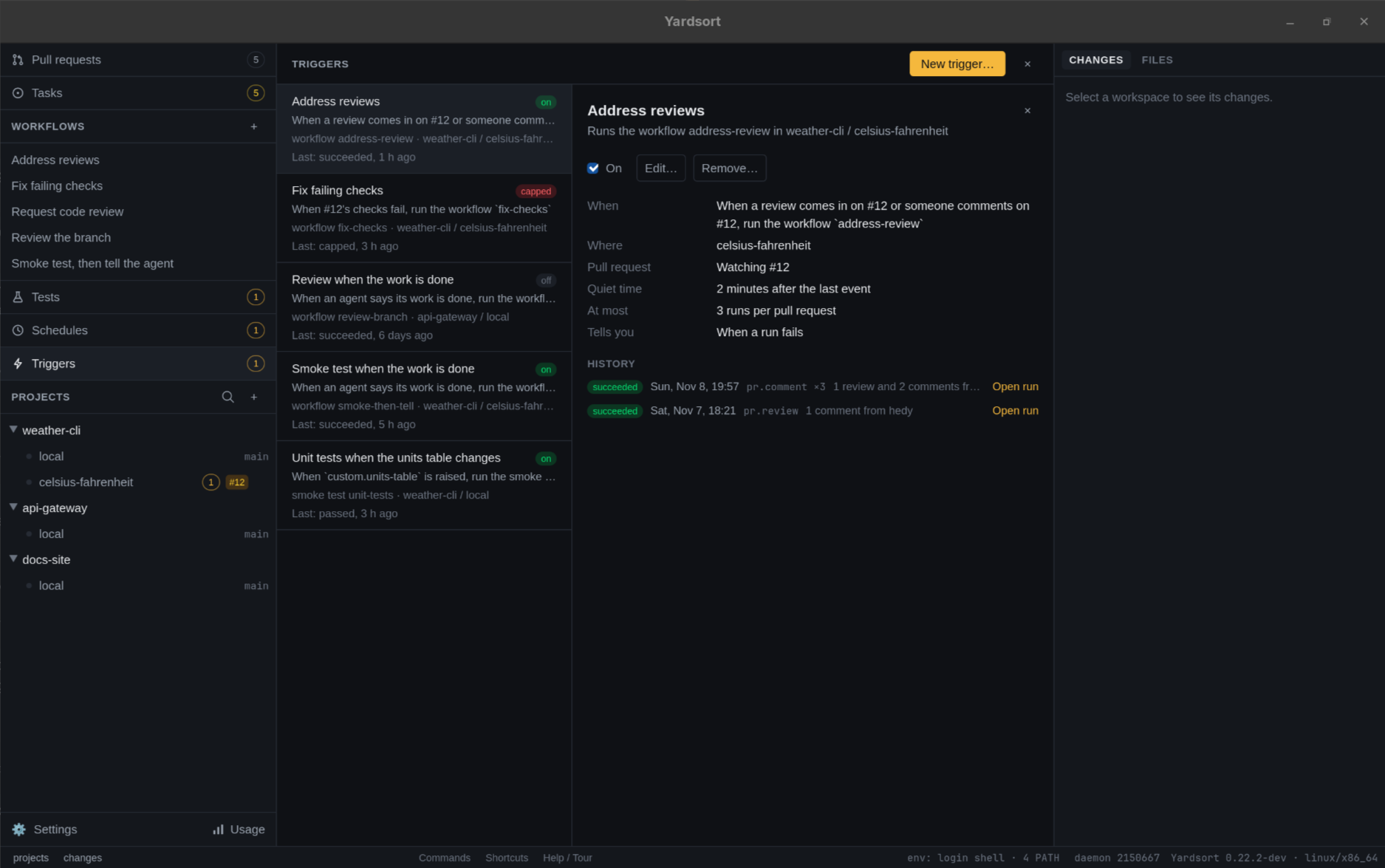
In the Triggers view each trigger shows its event in words — When a review comes in on #142 once its pull request is known — where it is, what it runs, how its last fire went, and a badge: on, running, waiting, waiting for approval, capped, refused, off, no workspace when its workspace was deleted, or ended when the agent it belongs to has ended. The number beside Triggers in the sidebar counts those that need you: capped, refused, waiting for approval, or with no workspace.
A trigger opens to its switch, Edit…, Reset when it is capped, Remove…, what it is
set to, the pull request it is watching, and its history, newest first, each line with Open
run when it started one: that run, open in the workflow's view or the workspace's smoke tests.
ys trigger fires <trigger> lists the same:
| Outcome | Meaning |
|---|---|
| running, succeeded, passed, failed | A run was started; this is how it stands, or how it ended |
| waiting for approval | Its run waits for you to approve the test file |
| waiting | A run of the same thing is going there; this one starts when it ends |
| skipped | Its agent session, or any agent in the workspace, was not running to be told |
| capped | It had started as many runs as --cap allows. Later events go on this line |
| refused | A run could not be started, with the reason |
From the command line
ys trigger presets              # the ready-made triggers
ys trigger list                 # every trigger: what it listens for, what it runs, where, how it stands
ys trigger show Tell            # its events, filters, inputs, limits and last fire
ys trigger pause Tell           # off: keeps its history, fires nothing
ys trigger resume Tell          # on again; only what happens from now counts
ys trigger reset Tell           # lift its cap
ys trigger fires Tell           # its history
ys trigger remove Tell          # the trigger and its history; the runs it started stay
A trigger is named by its name, its id, or the start of its id. --json works as everywhere.
See ys trigger.
What it does not do yet
- Forges other than GitHub. The pull request events need
gh. - A workflow step that raises a custom event. A workflow raises one through a smoke test it
runs, or by asking its agent to; its own ending is
workflow.finished. - Run while Yardsort is closed. What happened is found when it next opens.