
Settings & harnesses
Use Settings to configure Yardsort, choose the commands that launch your coding agents and add custom harnesses. A harness is an agent's command and argument templates; it uses the agent you have installed and authenticated on your computer.
Open with the Settings button at the bottom of the left panel, or Ctrl+Shift+, / ⌘,.
Most settings are stored in a plain TOML file you can read, back up and edit:
| System | Location |
|---|---|
| Linux | ~/.config/dev.yardsort.app/settings.toml |
| macOS | ~/Library/Application Support/dev.yardsort.app/settings.toml |
| Windows | %APPDATA%\dev.yardsort.app\settings.toml |
If the file cannot be parsed, Yardsort says so, runs on defaults, and keeps your file as
settings.toml.unreadable instead of overwriting it.
Harnesses
A harness is a coding agent that runs in a terminal. To Yardsort a harness is pure configuration — a command and some argument templates — so any agent can be added without waiting for a new release.
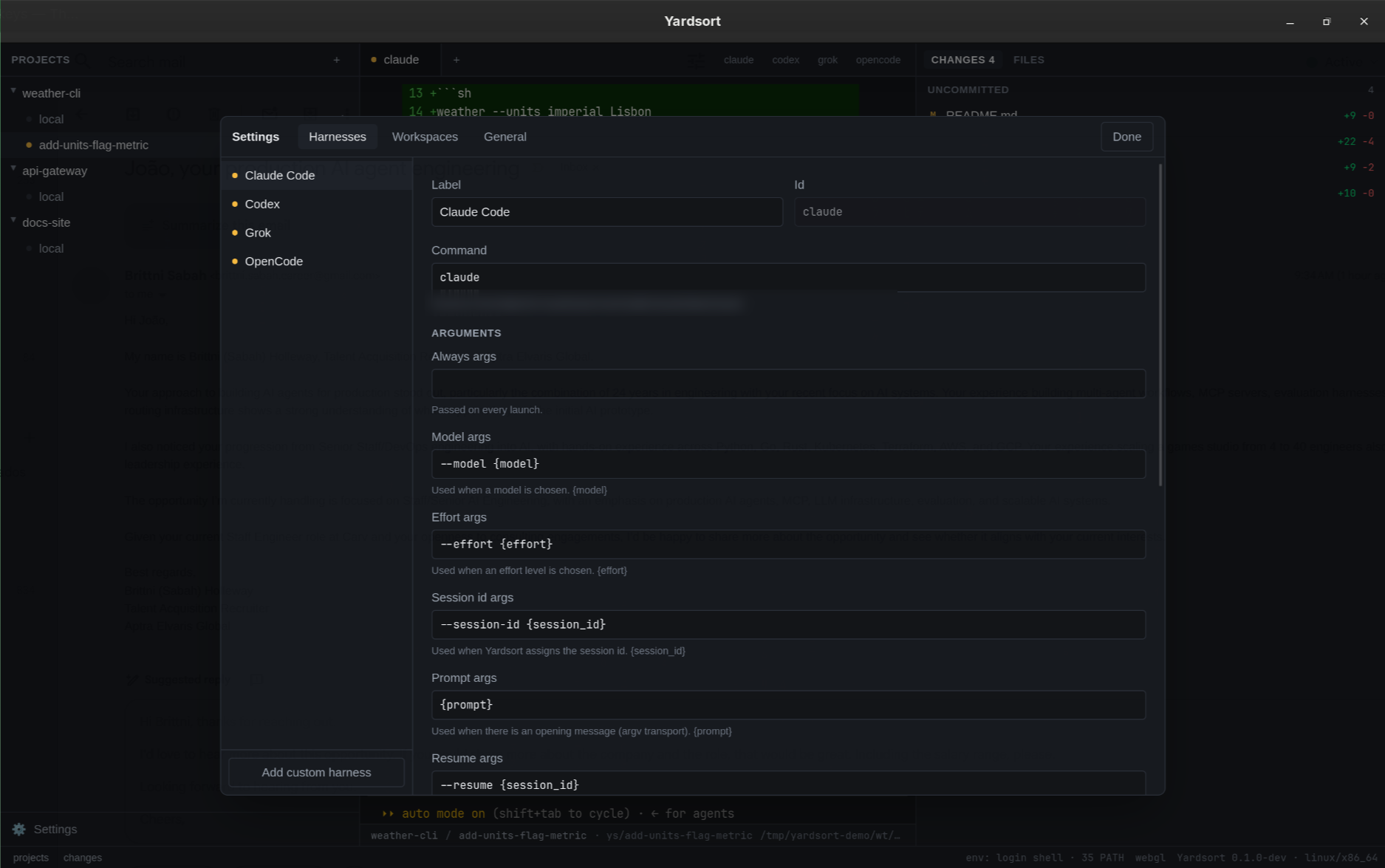
Built in: Claude Code, Codex, Grok, OpenCode, OMP, Cursor, Pi.
The dot next to each shows whether its command was found on your PATH, and the mark beside it is the one that identifies that
agent everywhere else in the app — the tab strip, the composer's picker, the session history. A
harness you add yourself is drawn as its initial.
OMP and Pi offer a thinking level through the effort picker and accept provider/model
model names. Cursor runs cursor-agent, not the cursor editor command; if your installation
only exposes agent, change its Command to agent. Install links on the welcome screen
lead to each CLI's own setup instructions. Install and sign in before launching a workspace.
Pi's built-in definition requires a version with --session-id and --fork (verified with
0.87.1). OMP and Cursor resume only the latest conversation in a workspace and do not offer
Fork. Pi supports resuming and forking individual conversations.
Opening messages for OMP and Pi are prefixed with a space so an initial @ is treated as
text, not a file attachment. Keep that space in their Prompt args templates. Cursor's
Write args are empty: drafting uses another available writer or your API-key fallback.
If you already had a custom harness with id omp, cursor or pi, it stays custom and
keeps its command, argument templates and session identity. It takes precedence over the
built-in with that id. Deleting the custom entry reveals the built-in; keep the custom entry
if you still need it to resume older conversations.
Fields
| Field | Meaning |
|---|---|
| Label | The name shown in the app. |
| Command | The program to run. It is looked up on the PATH of your login shell (so tools installed by mise, nvm, Homebrew or cargo are found), and the resolved location is shown underneath. |
| Always args | Passed on every launch — the place for flags you always want, such as a permission mode. |
| Auto args | What starts the agent in its auto permission mode, e.g. --permission-mode auto. Passed only while Always start in auto mode is ticked — see below. |
| Model args | Used when a model is chosen, e.g. --model {model}. |
| Effort args | Used when an effort level is chosen, e.g. --effort {effort}. |
| Session id args | Used when Yardsort assigns the conversation's id, e.g. --session-id {session_id}. |
| Context args | Background context for a new conversation — the agent's system-prompt option — with {context} for the text, e.g. --append-system-prompt {context}. Yardsort puts the note about the workspace's other conversations there. Set for Claude Code, Codex (-c developer_instructions={context}), Grok (--rules {context}), OMP (--append-system-prompt={context}) and pi, the five checked to work; empty means the note goes after the first message instead. |
| Prompt args | How the first message is passed, e.g. -- {prompt} or --prompt {prompt}. Keep the -- when the prompt is a bare argument: it tells the agent's own parser that the options have ended, so a message starting with - is read as text rather than as a flag. |
| Resume args | Replaces the last two groups to continue a conversation, e.g. --resume {session_id}. |
| Fork args | Same, to fork one, e.g. --resume {session_id} --fork-session --session-id {new_session_id}. |
| Resume context args | The same for a resumed or forked conversation, after the resume or fork args, so it is told about the conversations there are now. For OMP and pi they are the context args, since both build their system prompt at each launch. For Claude Code they are --system-prompt-snapshot off --append-system-prompt {context}: Claude Code otherwise sends the system prompt a conversation began with, and with the snapshot off it builds it afresh for that launch. Empty for Codex and Grok, which keep that prompt whatever they are passed. A Claude Code too old to know --system-prompt-snapshot refuses to start with it; clear this field, or update Claude Code. |
| Write args | The agent's non-interactive mode, used to have it write a commit message or a pull request — e.g. --print {prompt}, exec {prompt}, run {prompt}. Its whole command line, with {prompt} for the question. Empty means this agent will not be asked. See Commits & pull requests. |
| Models / Efforts | Suggestions for the composer's pickers. Models accept free text regardless. Leave efforts empty to hide that picker. |
| Prompt transport | argv passes the prompt as an argument — simple and reliable. stdin starts the agent first and pastes the prompt once it has been quiet for the given time — for agents with no prompt argument. Very long prompts switch to stdin automatically. |
| Session id | assigned: Yardsort chooses the id, so any session can be resumed. latest in folder: the agent chooses, and only its most recent conversation in a workspace can be continued. |
| Good at | Optional, in your words: what this harness suits. Used only by Assist, to suggest a harness for the message you are typing. Yardsort never fills this in for you. |
| Enabled | Disabled harnesses stay configured but are not offered. |
Auto mode
Tick Always start in auto mode on a harness and every session of it — new, resumed or forked — starts in the agent's own auto mode, so it asks you less often. It is off until you turn it on, for each harness separately. Each built-in knows its flag:
| Harness | Auto args | What the agent still asks about |
|---|---|---|
| Claude Code, Grok | --permission-mode auto | Whatever its own auto mode judges risky. |
| Codex | --approve-for-me | Approvals go to Codex's automatic review, in its sandbox. |
| OpenCode | --auto | Only what your OpenCode config explicitly denies — the broadest. |
| OMP | --approval-mode=write | Running commands and other exec tools; reads and edits go ahead. |
| Cursor | --auto-review | Whatever Cursor's reviewer does not consider safe. |
| Pi | — | Pi asks nothing, so the switch is unavailable. |
What auto mode allows is the agent's decision, not Yardsort's — read its documentation before turning it on. For a custom harness, type its flag into Auto args and the switch becomes available. Drafting a commit message or a pull request never uses auto mode: it runs no tools.
How arguments work
- Arguments are split like a shell would split them (quotes group words), but no shell is involved. Each argument reaches the program exactly as written, and a placeholder's value is never split again — a prompt full of quotes, spaces and newlines is still one argument.
- Placeholders:
{prompt}{model}{effort}{session_id}{new_session_id}. - A group whose placeholder has no value is dropped whole: choose no model and no dangling
--modelis passed.
What will run at the bottom shows the exact command lines — start, resume and fork — for sample values, updating as you type. Test launch starts the harness, unsaved changes included, in a scratch terminal so you can see it come up.
Restoring defaults
For a built-in harness only your changes are saved, so improved defaults in a newer Yardsort still reach every field you left alone. Restore defaults discards your changes.
Adding your own harness
Add custom harness, give it an id, and fill in at least the command. If the agent can take a first message, set Prompt args (or the stdin transport); fill Resume args / Fork args if it can continue conversations, and Write args if it has a print or exec mode and you would like it writing your commit messages. Custom harnesses appear in the composer and the tab bar like the built-in ones. Delete removes one.
Assist
Optional AI help from TypeSafe's Jev model: badges on changed files, and suggestions in the composer. It is off until you enter your own API key and tick a feature, and each feature says exactly what it sends. A third switch, under the review, tells Assist who wrote each changed file in the Changes list's own words; it is off by default because it changes what is sent. The key is kept in your system credential store, never in this file.
See Assist for the whole feature, including what happens when it is unavailable.
Workspaces
| Setting | Meaning |
|---|---|
| Worktree folder | New workspaces are created in <folder>/<project>/<workspace>. Default: ~/yardsort. Must be an absolute path; keep it short on Windows, where deep paths hit the 260-character limit. |
| Branch prefix | New branches are named <prefix>/<workspace>. Default ys. Empty means no prefix. |
Both apply to workspaces created from now on; existing ones stay where they are.
General
| Setting | Meaning |
|---|---|
| Editor command | What Edit ↗ runs — code, cursor, zed, … It is given the workspace folder and then the file. Empty tries cursor, code, zed, windsurf, subl and idea in turn. |
| Check for updates automatically | Looks for a newer release shortly after starting, once a day, and when you return to the window if that is overdue. On by default. Check now looks immediately and shows the version you are running. See Updates. |
| Command line | Where your terminal finds the ys command, and whether it is this version. Install ys (or Update) appears when it is missing or old, except where your package already installed it. See Installing ys. |
| Notify me when an agent finishes | Desktop notifications when a busy agent goes quiet while you are in another window. On by default. |
| Record when agents start and exit | Keep a local record of each process Yardsort starts in a workspace and how it ended — see Activity. On by default; nothing an agent prints is read, and nothing leaves the machine. Off, and nothing new is written. |
| Show the activity timeline | Experimental: an Activity button in each workspace's footer opens the list of what was recorded there. Off by default. |
| Capture what Cursor reports | Off by default. The Cursor agent started from Yardsort is given a small plugin, on its command line for that launch alone, whose hooks report each tool with its file or duration, each file it changes and — where Cursor fires it — each turn with its tokens; see What Cursor reports. Your own Cursor hooks are not edited and keep running. Needs the recording switch. |
| Capture what OMP reports, Capture what pi reports | Off by default. OMP or pi started from Yardsort is given a small extension, on its command line for that launch alone, that reports each turn with its tokens, each tool with its file or duration, and (OMP) each permission you answer — see What OMP and pi report. Your own extensions keep running. Needs the recording switch. |
| Read what Grok records | Off by default. For Grok started from Yardsort, reads the metadata-only event log and usage file Grok keeps in its own session directory — tools with durations, permissions you answered, turns and tokens — see What Grok records. Nothing is given to Grok and nothing in ~/.grok is written. Needs the recording switch. |
| Capture what OpenCode reports | Off by default. OpenCode started from Yardsort is given a small plugin through its environment, for that launch alone, that reports each prompt, tool, file edit, permission prompt and turn with its token usage — see What OpenCode reports. Your opencode.json is not edited and your own plugins keep running. Needs the recording switch. |
| Capture what Codex reports | Off by default. Codex started from Yardsort is given a notify program for that launch, and each turn's commands, file changes and token usage are read from Codex's own session file — see What Codex reports. Nothing in ~/.codex is edited, and a notify of your own still runs. Needs the recording switch. |
| Capture what Claude Code reports | Off by default. Claude Code started from Yardsort is given hooks that report each prompt, tool, turn and session end as metadata — see What Claude Code reports. Your own Claude Code settings are never edited; the hooks ride on a per-launch settings file. Needs the recording switch above. |
| Clear all recorded activity | Forgets every recorded event and run at once. Beneath it: how much is recorded, where the exit spool, the agents' inbox and the Claude Code hooks file are, and counters for anything that went wrong while recording. |
Usage
The Usage panel has its own Show Usage in the sidebar switch in its header. Hiding the
button leaves Usage available from the command palette. This preference is saved under
[usage] as show_in_sidebar in settings.toml. Token usage reads the agents' own logs
independently of the recording and capture switches above. See Usage.
Workflow writer
Under Assist → Writing commit messages, pull requests and workflows, choose the
Workflow writer used by Write it on a new workflow. Automatic finds an installed,
enabled harness with Write args; you can instead select a specific available harness.
The choice is saved as workflow_harness_id under [draft] in settings.toml and does not
change the agent used for workspace commit or pull request drafts. See Workflows
and Assist for availability and API fallback behaviour.
Environment variables
For testing and unusual setups:
| Variable | Effect |
|---|---|
YARDSORT_DATA_DIR | Keep the database and settings.toml in this folder — a throwaway profile. Each one gets its own background process, so its agents are separate too. |
YARDSORT_WORKTREE_ROOT | Override the worktree folder. |
YARDSORT_YS_DIR | Where Install ys puts ys, instead of ~/.local/bin, /usr/local/bin or %LOCALAPPDATA%\dev.yardsort.app\bin. A development build refreshes a copy there at startup too, which it otherwise never does. |
YARDSORT_NO_DAEMON | Run terminals inside Yardsort, as it did before v0.4: they stop when it closes. |
Programs started in a workspace are themselves given YARDSORT_RUN_ID, YARDSORT_WORKSPACE_ID
and, for an agent, YARDSORT_SESSION_RECORD_ID — ids a script or hook can use to say which run
it belongs to. See Activity.
Keyboard
Settings → Keyboard, Shortcuts in the bottom bar, or Mod+/ opens a searchable cheat
sheet and editable bindings. Record a combination, clear a binding or restore defaults, then
press Save shortcuts. Conflicts are shown before saving. See Keyboard shortcuts
for defaults and navigation instructions. These preferences live in the profile's SQLite UI
state rather than settings.toml.
The optional first-launch tour can be replayed from Help / Tour in the bottom bar or from the command palette (Mod+K). See First launch.