
Assist
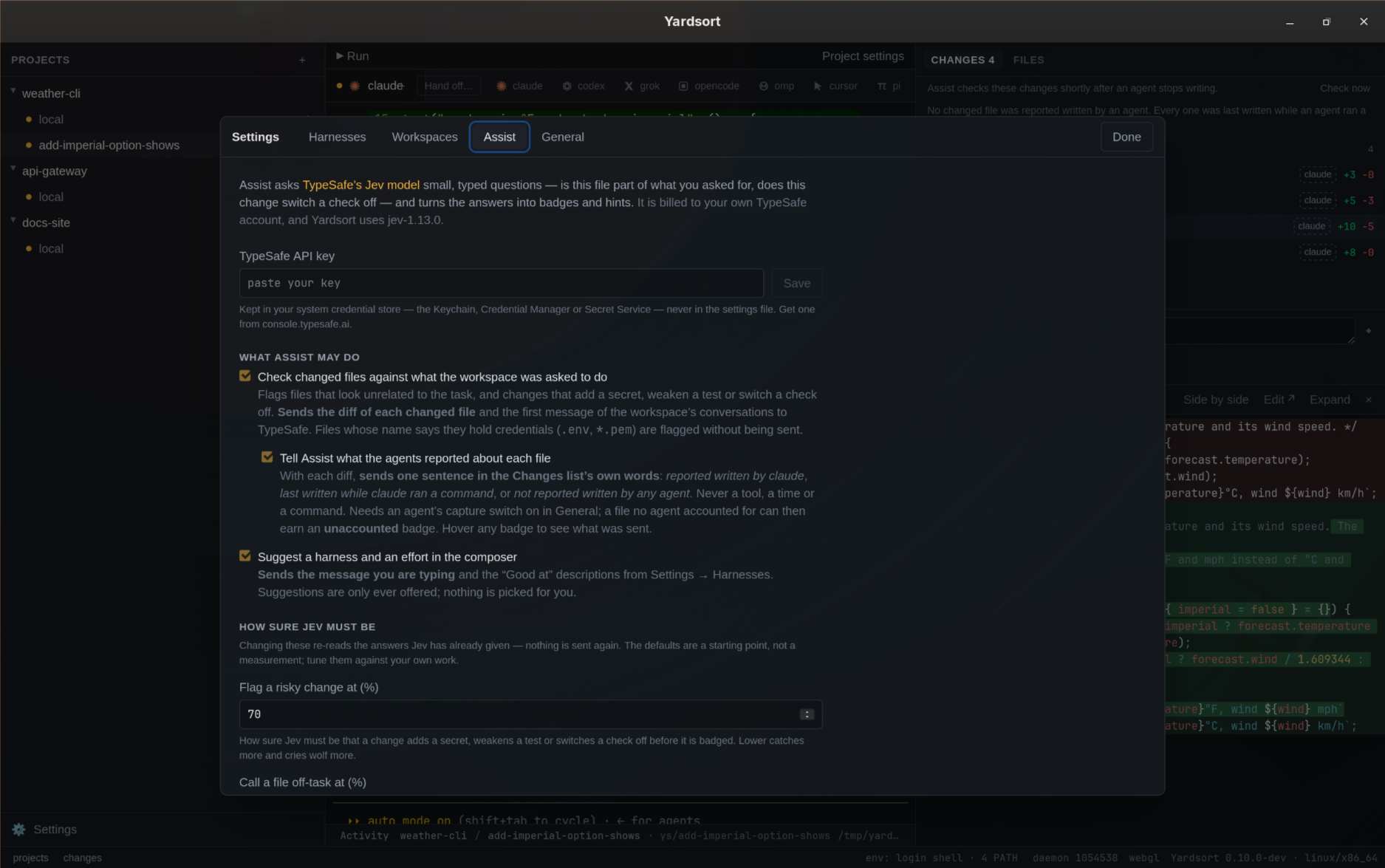
Assist is optional help from an AI model that does not write anything: it answers small, typed questions about your changes and about the message you are typing, and Yardsort turns the answers into badges and suggestions. It is off until you enter an API key and tick a box.
It uses Jev, TypeSafe's judgment model. Jev never generates text — it
returns a probability, a choice, or a level, and Yardsort decides what that means. Requests are
billed to your own TypeSafe account; Yardsort asks for the pinned model jev-1.13.0.
Yardsort never sends your terminals anywhere. Status dots, readiness and notifications still come from terminal activity alone, and Assist never reads what an agent printed.
Getting a key
- Get an API key from the TypeSafe console.
- Settings → Assist, paste it, press Save. Yardsort checks the key with TypeSafe before keeping it.
- Tick the features you want.
The key is kept in your system credential store — Keychain on macOS, Credential Manager on
Windows, the Secret Service (GNOME Keyring, KWallet) on Linux — and never in settings.toml. It is
never shown again; only the last four characters are, so you can tell keys apart. Test asks
TypeSafe whether it still works, Forget removes it.
If your Linux session has no Secret Service running, Settings says so and Yardsort falls back to
the TYPESAFE_API_KEY environment variable — the same variable TypeSafe's own SDKs read. A key you
save in Settings takes precedence over that variable.
Checking changed files
Settings → Assist → "Check changed files against what the workspace was asked to do".
Shortly after an agent stops writing, the Changes list is checked file by file, and flagged files get a badge:
| Badge | What it means |
|---|---|
| off-task | The change looks unrelated to what this workspace was asked to do. |
| secret | The change looks like it adds a literal key, token or password. |
| tests | The change looks like it deletes, skips or weakens a test. |
| checks | The change looks like it switches a lint, type check or CI step off. |
| credentials | The file's name says it holds credentials. Its contents were not sent (see below). |
| unaccounted | No agent reported writing this file while the agents here were reporting, and the change looks substantive. Only with the switch below. |
The line above the list says when Assist last looked, and Check now asks again immediately. Hovering a badge explains it.
"What was asked" is the first message of each of this workspace's conversations. A workspace Yardsort has no message for — an adopted worktree, or an existing branch you opened — still gets the risk checks; the line above the list says so.
What is sent: the diff of each changed file, that file's path, and the task. Very long diffs
are cut short. Binary files and files too large to show are skipped. Files whose name says they
hold credentials (.env, *.pem, *.key, id_ed25519, .npmrc…) are badged without their
contents ever being sent — .env.example and friends are not treated as secret.
Answers are cached per file: watching an agent work re-asks only about the file whose diff actually changed.
Telling Assist who wrote each file
Settings → Assist → "Tell Assist what the agents reported about each file". Off by default, and only offered once the review above is on.
The Changes list already shows which files an agent reported writing, which were written while an agent ran a command, and which have no report. With this switch on, the same fact goes with each diff, as one sentence in the list's own words: reported written by claude, last written while claude ran a command; no agent reported writing it, or not reported written by any agent, though the agents in this workspace were reporting what they wrote. Never a tool's name, a time, or a command. When no agent run in the workspace was reporting, nothing is added at all.
Two things come of it. The existing questions see the sentence, so a file the agent itself reported writing is judged with that in view. And a file no agent accounted for gets one more question — is the change substantive, rather than formatting, whitespace, generated output or a lock file? — whose answer is the unaccounted badge. Hover any badge on a file to see the exact sentence Assist was told about it.
Needs an agent's Capture what … reports switch on in Settings → General, or there is nothing to tell. See Activity.
Suggestions in the composer
Settings → Assist → "Suggest a harness and an effort in the composer".
While you type the first message, Assist can offer a harness and an effort level. Press Use to apply it; ignore it and nothing happens. Nothing is ever picked for you, and a suggestion appears only when the model is reasonably sure.
The harness suggestion is built on your descriptions, not on Yardsort's opinion of any agent: fill in Good at for two or more harnesses in Settings → Harnesses, for example "long refactors and tricky debugging" or "quick, well-specified edits". Harnesses without a description are never suggested.
The effort suggestion comes from how demanding the request looks, mapped onto the effort levels that harness offers.
What is sent: the message you are typing (once typing pauses, and only from about 15 characters), and the "Good at" descriptions.
Checking memory proposals
Settings → Assist → "Check memory proposals for repeats and contradictions". Off by default.
In a project's Memory view, each proposal an agent made is marked repeats an entry when Jev reads it as saying what an approved entry already says, and may contradict an entry when it reads it as saying the opposite of one. Two questions, one each, at the same threshold as the risk flags.
What is sent: the proposals waiting in that project and its approved entries — nothing else. Answers are cached, so opening the view again asks nothing new. Jev never writes or approves an entry; the marks help you decide.
Tuning what gets flagged
Settings → Assist → "How sure Jev must be".
Jev answers with probabilities, and these three numbers decide when a probability is worth your attention. The defaults are a starting point, not a measurement — tune them against your own work.
| Threshold | Default | Meaning |
|---|---|---|
| Flag a risky change at | 70% | How sure Jev must be that a change adds a secret, weakens a test or switches a check off. |
| Call a file off-task at | 60% | How much of the answer must say "unrelated to the task" before the off-task badge appears. |
| Offer a composer suggestion at | 50% | How sure Jev must be about a harness or a difficulty before the composer offers it. |
Lower numbers catch more and cry wolf more; higher ones stay quiet and miss more. Each is a percentage between 5 and 95, and Restore defaults puts all three back.
Changing a threshold costs nothing. Yardsort caches Jev's answers, not the badges, so the new numbers are applied to answers it already has — no new requests, no waiting.
When something goes wrong
Nothing here is load-bearing. Without a key, switched off, offline, or rate-limited, Yardsort works exactly as it does otherwise — you just get no badges and no suggestions. Failures appear as a quiet line above the change list, never as a blocked action.
| Message | What to do |
|---|---|
| "TypeSafe did not accept the API key" | The key is wrong or revoked. Save a new one. |
| "TypeSafe is rate limiting…" | Too many requests; it retries a few times, then gives up quietly. |
| "The system credential store is not available" | Start a keyring, or set TYPESAFE_API_KEY. |
Settings file
Only the switches are stored, in settings.toml; the key never is.
[assist]
review_changes = true
suggest_in_composer = true
send_provenance = false
check_memory = false
flag_at_percent = 70
off_task_at_percent = 60
suggest_at_percent = 50
Only what differs from the defaults is written, so a value you never touched keeps following Yardsort's default if that ever changes.
Writing commit messages, pull requests and workflows
Assist does not write text. Jev answers typed questions — a probability, a choice, a score — and that is all it does; there is no wording anywhere in this page that came from a model.
Having a model write a commit message or a pull request is a separate thing with its own switch, settled at the foot of this settings page because that is where optional AI lives. It uses the coding agent you already have, or your own Anthropic API key. See Commits & pull requests. The same switch and the same writers are behind Write it on a new workflow, which turns a description into a workflow file for you to check and save.
Workflow writer chooses which harness writes workflow files: Claude Code, Codex, or any installed, enabled harness with Write args, including your custom ones. Automatic uses the first available writer. Harnesses that are disabled, missing, or have no Write args are shown but cannot be selected. If your saved choice later becomes unavailable, the description box explains how to fix it; choosing Automatic clears the preference. The optional API key remains a fallback if an available agent fails, or no agent is available in Automatic mode. Commit and pull request drafting still prefers the workspace's own agent.