
Workflows
A workflow is a named, reusable piece of agent work that runs in steps. For example: have a second
agent review this workspace's pull request, then tell me and the agent that wrote it. You write
one as a short YAML file. Yardsort checks every name and every {{ variable }} in it before it
runs anything, and names the line and column of each mistake.
Workflows have their own section at the top of the sidebar. Open one to see its steps as a chart,
edit its file, and follow its runs; Run… starts it. ys workflow run starts one from a
terminal, with Yardsort open, because the app is what carries runs out.
The Workflows section
Workflows, above Projects in the sidebar, lists every workflow: the built-in ones and yours, by name. A number on a row is how many of its runs are going now; a red ! means the file has problems and cannot run; an orange dot means unsaved changes. Click a row to open it in the center panel. + starts a new one.
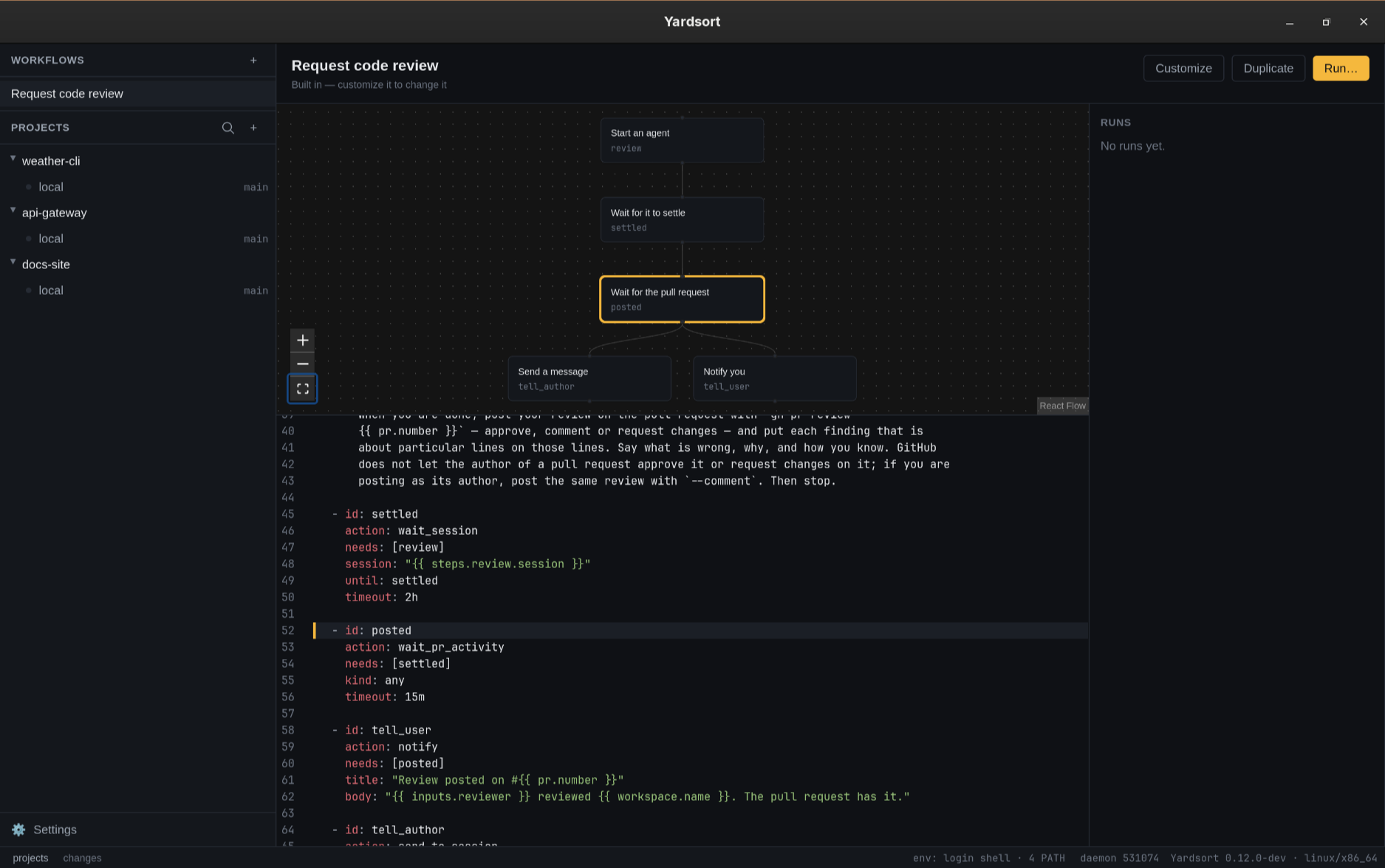
The center panel shows three things:
- The chart. Every step as a box, top to bottom, with an arrow from each step to the ones
that need it. Steps that need the same ones sit side by side. The chart is drawn from the file
and follows it as you type. Click a box (or focus it and press Enter or Space) to select
that step and scroll the YAML editor to its highlighted
idline, including in read-only built-ins. Click the chart background to clear the selection. With a run open in the list on the right, each box shows how that step went in it. - The file. A YAML editor. Every pause in typing checks the file, and each problem is marked where it is and listed under the editor. A built-in is read-only: Customize copies it into your folder under the same id, so your copy is used instead of it, and Duplicate copies it under a new id, as a second workflow. Your own file has Save, Revert while there are unsaved changes, Duplicate, and Delete, or Reset to built-in for a copy that replaces one, which deletes your copy and brings the built-in back. Deleting asks first. Unsaved changes are kept while Yardsort is open, so you can look at another workflow and come back; they are gone when it quits.
- Runs. This workflow's runs, newest first, with the workspace and when each was asked for. Open one for its steps, what each left or why it failed or was skipped, and the pull request it is about. A run still going has Cancel run.
Run… opens a dialog. It asks for the workspace and for each of the workflow's inputs; an agent
is picked from the same list as the composer's, with those not installed greyed out. If the
workflow works with the pull request, the dialog looks it up and shows it, or says why there is
none to use. It also says what the run would find nothing for: a prompt that uses
{{ workspace.task }} in a workspace started without a first message, {{ memory }} in a
project that does not share it, or {{ workspace.base_branch }} on the default branch, which is
based on nothing. Those are notes, not refusals; the line renders empty. The run starts when you
press Run, and appears at the top of the runs at once.
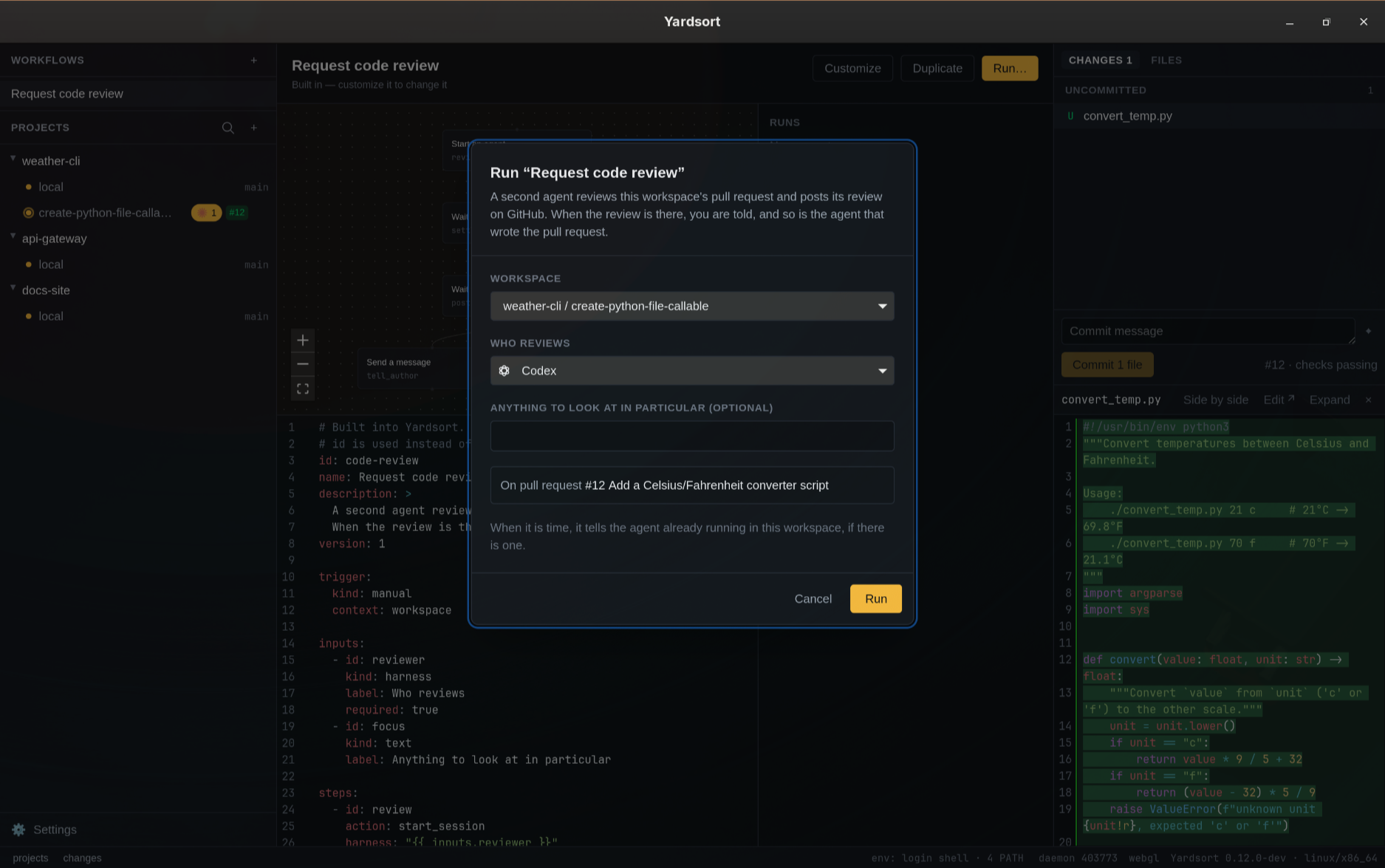
A workspace's menu has Run workflow…, which opens the same dialog for that workspace, and Request code review…, which opens it on the built-in review.
+ in the sidebar starts a new workflow from a short example, with every part a file needs.
Give it an id and Save: it is written as <id>.yaml in your folder, and never over a file
already there.
Or describe it. A new workflow has a box above the editor: say what it should do, in your own words, and press Write it. The agent you already have writes it, in its non-interactive mode, or your Anthropic API key does. Choose Settings → Assist → Workflow writer to use Claude Code, Codex, or any installed, enabled harness with Write args, including a custom harness. Automatic chooses the first installed writer; the optional Anthropic key is the fallback when no agent can write or an agent fails. An explicitly selected writer that becomes unavailable is reported: install or enable it, configure its Write args, or choose another writer. This preference is saved across restarts and only applies to workflow files. The enable switch is shared with having a commit message written. The model is told the file format and shown the built-in review as an example. What it writes is checked like any file; when it has problems it is sent back once, with them, and whatever comes back goes into the editor unsaved, with anything still wrong marked where it is. Nothing a model wrote is a workflow until you save it. The agent runs in an empty repository of the profile's own, never in one of your projects; a repository because some agents will not run outside one.
Where workflows come from
- Built in. Yardsort ships with one: Request code review (
code-review). A second agent, one you pick, reviews the workspace's pull request in the same worktree and posts its review on GitHub withgh. When the review is on the pull request, you get a notification, and the agent that wrote the pull request is told once it is not busy. See Requesting a code review.ys workflow show code-reviewprints the whole file. - Yours. Every
.yamlor.ymlfile in theworkflowsfolder of Yardsort's data directory. Where Yardsort keeps things says where that is on your system, andys workflow listprints it.
A file with a built-in's id is used instead of that built-in. That is how you change one:
ys workflow copy code-review                       # your copy, used instead of the built-in
ys workflow copy code-review --as careful-review   # or a second workflow beside it
copy writes the file into your folder, prints where, and never overwrites a file that is
already there. Edit the copy, then check it with ys workflow validate. Delete the file and the
built-in comes back. If your copy has a mistake, it is listed with its problems and does not run.
The built-in does not quietly run in its place.
Use copy rather than redirecting ys workflow show into the folder. The shell creates the
empty file before ys runs, so ys finds that empty file under the built-in's id and prints
nothing useful. Windows PowerShell's > also writes UTF-16, which is not a workflow file.
If two of your files have the same id, the first by file name is used. The other is listed with
a problem saying which file it clashes with.
Workflows only come from your own folder, never from a project's repository. A workflow decides what is sent to your agents. A repository you cloned should not get to decide that.
An example
id: fix-tests
name: Fix the failing tests
description: An agent runs the tests on this workspace's branch and fixes what fails.
version: 1

trigger:
  kind: manual

inputs:
  - id: fixer
    kind: harness
    label: Who fixes it
    required: true

steps:
  - id: fix
    action: start_session
    harness: "{{ inputs.fixer }}"
    prompt: |
      Run this project's tests on `{{ workspace.branch }}`. Fix what fails, and commit the fix.

      {{ memory }}

  - id: done
    action: wait_session
    needs: [fix]
    session: "{{ steps.fix.session }}"
    timeout: 1h

  - id: tell_me
    action: notify
    needs: [done]
    title: "{{ workspace.name }}: the tests are fixed"
Steps run as soon as every step in their needs has succeeded, so steps can run side by side.
tell_me waits for done, and done waits for fix. Two steps that both need done would run
together.
Running a workflow
Run… on the workflow, or Run workflow… in a workspace's menu, asks the same questions as the command line and starts the run. From a terminal, with Yardsort open, because the app is what carries runs out in the background while you keep working:
ys workflow run fix-tests --workspace fix-login --input fixer=claude
--workspace takes a workspace's name or id. Run it inside a workspace's folder, or in an
agent's terminal there, and it can be left out. Give each input as --input id=value. ys
checks everything before anything is queued:
- the workflow is ready to run
- the workspace is there and not archived
- every required input is given, there are no inputs the workflow does not ask for, a
choiceis one of its options, and an agent named by aharnessinput or a step is set up in Yardsort and on yourPATH - a workflow that uses the pull request has one to use: the branch the workspace has checked out
has an open pull request on GitHub, found with the GitHub CLI (
gh), which must be installed and logged in. Its number, link and title are kept with the run.
Optional inputs left out take their default, or are empty. A workflow runs once at a time in a
workspace: asking again while it runs is refused, naming the run. With Yardsort closed, ys says
so and queues nothing. When the run would find nothing for a variable the file uses — the task
of a workspace started without a first message, say — ys says so in a note after queuing, and
the Run dialog shows it before; the run goes ahead either way.
ys workflow run prints the run's id and returns at once. The app picks the run up within a
second, and moves each step on as soon as it can: every second, and the moment an agent goes
quiet or ends. To follow it:
ys workflow runs                  # every run, newest first
ys workflow runs --run 3f2a9c1e   # one run, step by step, with why a step failed or was skipped
ys workflow cancel 3f2a9c1e       # stop it
What each step does while it runs:
start_sessionstarts the agent exactly as the composer would, and it opens as a new tab in that workspace. The tab you were looking at stays in front. From then on it is an ordinary session: you can watch it, type to it, or close it.wait_sessionwaits until the agent has settled: it has gone quiet after at least 8 seconds of output, or its harness reported that it finished its turn. Withuntil: exitedit waits for the program to end. An agent that ends while it is waited on ends the wait too.send_to_sessionwaits until the agent is quiet, then types the message and presses Enter. It looks again at the moment of typing, and never types into a busy agent. If the agent ends first, the step is skipped.session: originis the workspace's own agent: its newest agent session that was running when the run started. A shell is not an agent, and neither is an agent the run starts itself. With none running then, the step is skipped, saying so.wait_pr_activitywaits for a review or a comment, askindsays, posted on the pull request after the run started. It asks GitHub every 30 seconds, in the background, so a slow answer holds up no other step; a question GitHub has not answered within a minute is dropped and asked again.notifyshows a system notification.
A step runs only when every step in its needs succeeded. When one fails, the steps after it are
skipped, and the run fails with that step's reason.
Cancelling stops the run. Agents it started keep running as ordinary sessions: close them as you would any other.
If Yardsort quits during a run, the run carries on when you open it again. A step that was waiting keeps waiting. A step Yardsort was in the middle of, such as starting an agent, fails saying so rather than being done twice. An agent that settled while Yardsort was closed is only noticed if its harness reported the finished turn.
Requesting a code review
The built-in Request code review has a second agent review a workspace's pull request, then tells you and the agent that wrote it. With the workspace's branch pushed and a pull request open on GitHub:
ys workflow run code-review --workspace fix-login --input reviewer=codex
Add --input focus="…" for anything to look at in particular. What happens:
- The reviewer starts in the same worktree, as a new tab. It is told the pull request, the task
the workspace was started with, and to read and run but not edit, since the author works in
the same folder. It posts its review with
gh pr review, putting findings on the lines they are about. - When the reviewer has settled and its review is on GitHub, you get a notification.
- At the same time, the agent that wrote the pull request, if it is still running in the workspace, is told the review is there once it is quiet, with the link, and asked to address it, push, and answer each comment.
GitHub does not let the author of a pull request approve it or request changes. When the reviewer
posts as the same GitHub account as the author, as it does when both use your gh login, it is
told to post its review as comments.
To change the prompts or the timeouts, ys workflow copy code-review and edit your copy.
The file
| Key | What it is |
|---|---|
id | Lowercase letters, digits and -, like fix-ci. Name the file after it. |
name | What the workflow is called in lists. |
description | Optional. One or two sentences. |
version | 1. A file with a later version is listed but not run, and says to update Yardsort. |
trigger | kind: manual: you start it. Optional context: workspace, the default and the only one: a run is about one workspace. |
inputs | Optional. What you are asked before a run starts. |
steps | At least one. |
Keys a workflow does not have are mistakes, not ignored. A misspelt promt: is reported, not
silently skipped.
Inputs
| Key | What it is |
|---|---|
id | Starts with a lowercase letter; then lowercase letters, digits, _ and -. Used as {{ inputs.<id> }}. |
kind | harness (one of your agents), text, or choice. |
label | Optional. The question. The id when left out. |
required | Optional. false when left out. An optional input left empty is empty text wherever it is used. |
default | Optional. For a choice, one of its options. |
options | For a choice only: the answers to pick from. |
Steps
Every step has an id, named the same way as an input, and an action. needs is optional: the
steps that must finish first. A step cannot need itself. Steps that wait for each other in a
circle are reported, because none of them could ever start.
| Action | Keys | What it does |
|---|---|---|
start_session | harness (required), prompt, model, effort, skip_memory | Starts an agent in the workspace, like the composer does, with prompt as its first message. It opens as a tab there. harness is an agent's id, like claude, or exactly {{ inputs.<id> }} for an input of kind harness. |
wait_session | session (required), until, timeout | Waits for a session. until: settled, the default, means it has gone quiet after at least 8 seconds of output, or its harness reported a finished turn. until: exited means the program has ended. |
send_to_session | session (required), prompt (required), timeout | Types prompt into a running session. It waits until that session is quiet: a busy agent is never interrupted. If the session is gone, the step is skipped. |
wait_pr_activity | kind, timeout | Waits for a new review or comment on the workspace's pull request, since the run started. kind is review, comment or any, the default. |
notify | title (required), body | Tells you, with a system notification. |
A key that belongs to another action is reported as misplaced. title on a start_session step
is an example.
session is origin, meaning the agent already working in the workspace when the run started, or
"{{ steps.<id>.session }}" for a session an earlier start_session step started. That step
must be among this step's needs, directly or through another step.
timeout is a whole number and a unit: 30s, 45m, 2h. At most a week. A step that runs
out of time fails.
Variables
Any text in a step can use {{ name }}. Only these names exist. A name is a dotted path and
nothing else: no filters, no expressions. Anything else is reported where it is written.
| Variable | What it is |
|---|---|
project.name, project.root | The project, and the folder of its own checkout. |
workspace.name, workspace.branch, workspace.base_branch, workspace.path, workspace.task | The workspace the run is about. task is the first message it was started with. In the project's own checkout, branch is whatever git has checked out, and base_branch the repository's default branch, unless that is the branch itself. |
pr.number, pr.url, pr.title | The open pull request for the workspace's branch, found when the run is queued. |
inputs.<id> | What was given for that input. |
steps.<id>.<field> | What an earlier step left: session and run from start_session, outcome from wait_session, count and latest_url from wait_pr_activity. The step must be among this step's needs. |
memory | The project's memory, as an agent is given it, when the project shares it. Empty otherwise. An agent's first message gets the memory after it anyway; put {{ memory }} in a start_session prompt to have it there instead, not twice. |
handoff | The workspace's handoff packet: what happened there so far. |
To write {{ literally, for example in a prompt about a template language, write \{{.
Checking a file
ys workflow validate <file> checks a file without needing Yardsort to have run on this machine.
It prints each problem as file:line:column: message and exits 1 if there are any:
$ ys workflow validate fix-tests.yaml
fix-tests.yaml:20:36: `{{ workspace.brnch }}`: `workspace` has no `brnch`. It has `name`, `branch`, `base_branch`, `path`, `task`.
fix-tests.yaml:26:13: There is no step `fx`. Did you mean `fix`?
fix-tests.yaml:27:15: `{{ steps.fix.session }}` is used before step `fix` is sure to have run. Add `fix` to this step's `needs`.
That is the example above with workspace.branch misspelt and needs: [fix] written [fx].
- reads the file from standard input. --json prints { valid, id, problems }.
ys workflow list shows every workflow, whether it is ready to run, and where it comes from.
ys workflow show <id> prints the file that would be used, with any problems after it. See
the ys command line.