
Parallel agents
Run Claude Code and Codex in parallel with git worktrees
Use Yardsort to give Claude Code and Codex separate tasks, prepare their worktrees, review each diff and open two focused pull requests.
By Yardsort · Published
Give Claude Code a testing task and Codex a documentation task in the same small repository. Yardsort will put them on separate branches in separate directories. You will review each result and, optionally, open two pull requests. This example deliberately avoids a shared development server or database so you can focus on how the workspaces behave.
Before you start
Install Yardsort and git. Install and authenticate Claude Code and Codex separately; confirm each can start in a fresh terminal before using it here. Check their provider accounts and usage allowances: running both can incur charges or consume subscription limits.
The example uses Node.js 20 or newer and its built-in test runner, with no package dependencies. Git needs a configured author name and email before your first commit. GitHub PRs additionally need a repository you can push to; a logged-in GitHub CLI lets Yardsort create the PR directly. You can complete the local review without a remote.
1. Create a small example repository
Create a new folder named yardsort-parallel-demo and open a terminal in it. Save these two
files with your editor.
package.json
{
  "name": "yardsort-parallel-demo",
  "private": true,
  "type": "module",
  "scripts": {
    "test": "node --test"
  }
}
sum.js
export function sum(values) {
  return values.reduce((total, value) => total + value, 0);
}
Initialize the repository and commit the starting files:
git init -b main
git add package.json sum.js
git commit -m "Add sum example"
Open that folder as a project in Yardsort. The local workspace represents this original
checkout. The next steps create two more checkouts from its committed main branch.
2. Give Claude Code the testing task
Press + on the project row. Pick Claude Code as the harness and select main under
New branch from. Leave model and effort at your preferred defaults. Paste this message:
Add sum.test.js using node:test and node:assert/strict for the existing sum function.
Cover an empty array, positive integers and negative integers. Run npm test.
Change only sum.test.js. Do not change the implementation, commit, push or open a PR.
Summarize the results and any limitations when finished.
Press Start. Yardsort creates a worktree and branch, then starts Claude Code inside it. The workspace name is derived from the message, so its exact name may differ from this article.
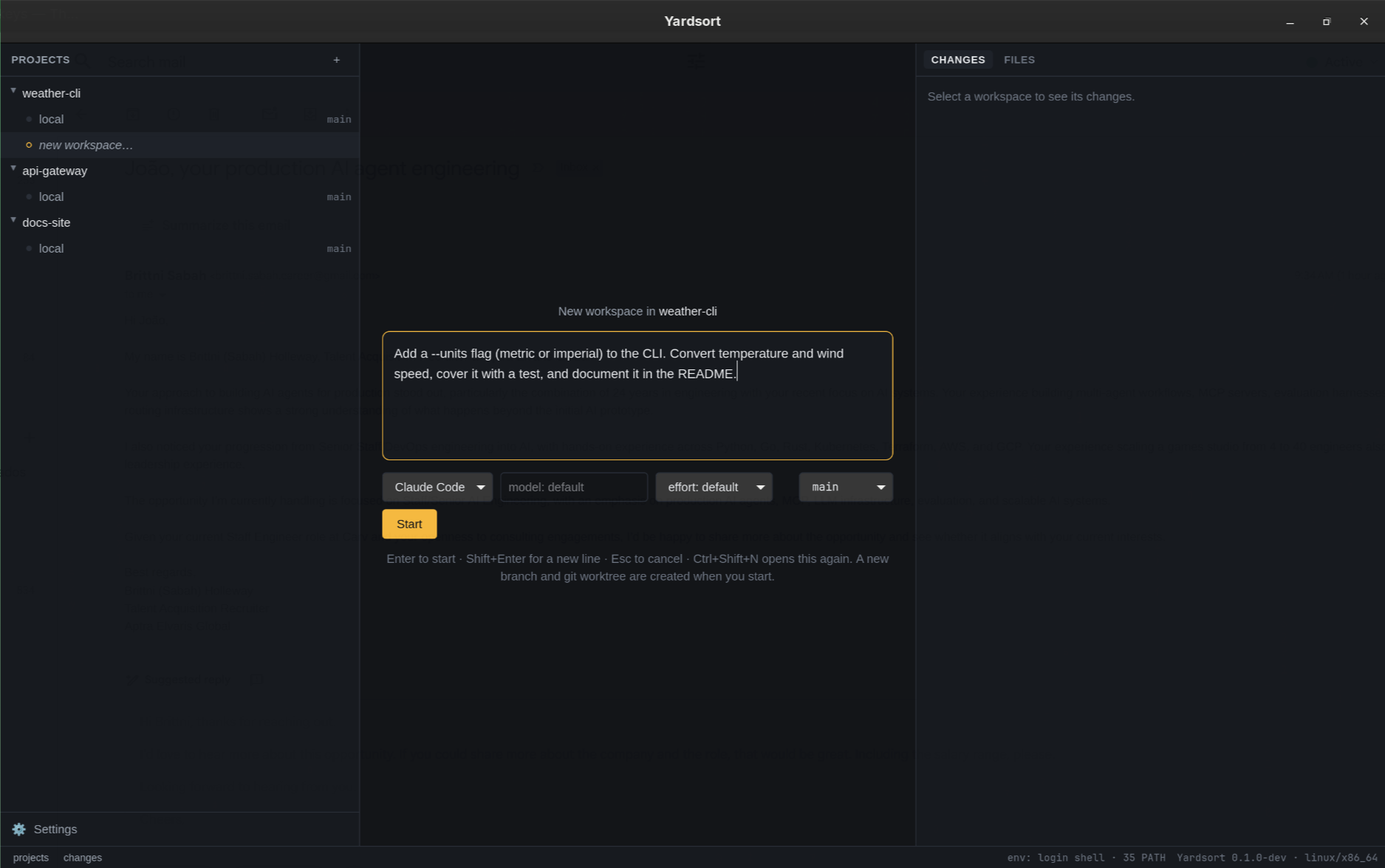
This screenshot illustrates the composer; enter the demo prompt above in your own project.
3. Give Codex an independent task
While Claude Code is working, press + on the same project again. Choose Codex, and again use New branch from → main. This is a new workspace, not another terminal tab inside Claude Code's workspace.
Create README.md for this small sum.js module. Include an import example, the result of
sum([2, 3]), and the behavior for an empty array. Explain that callers should provide
an array of numbers and that the function does not validate inputs. Change only README.md.
Do not change code, commit, push or open a PR. Verify examples against sum.js.
Press Start. Each agent can now edit its assigned files while the other runs. A prompt is an instruction to the agent, not an enforced file-access boundary; review the actual diff.
For a project with dependencies, use project setup to install them in each worktree. Ignored configuration from your original checkout does not appear in new worktrees automatically.
4. Check the separation and review both results
Select each workspace and inspect its Changes panel. Claude Code's branch should add
sum.test.js; Codex's branch should add README.md. Both started from the same committed code,
so neither branch automatically includes the other's new file.
Open a shell tab in either workspace and inspect:
git branch --show-current
git worktree list
git status --short
In Claude Code's workspace, run:
npm test
Read the tests as well as the result: they should exercise the exported function and contain real assertions. In Codex's workspace, check the examples yourself:
node --input-type=module -e "import { sum } from './sum.js'; console.log(sum([2, 3]), sum([]))"
The expected output is 5 0. Verify that the README describes only behavior present in the
implementation. Passing tests do not establish that an agent followed the requested scope.
5. Commit and optionally open two PRs
For each workspace, review every changed file before using Commit N files. Yardsort commits all changed files, including untracked ones. If an agent changed extra files, resolve that before committing or use your usual git tools to stage a smaller change.
If you want PRs, create an empty GitHub repository under your account and add its URL as the
origin remote using your normal GitHub setup. Push main from the original local checkout
first. Then use Open pull request in each task workspace; Yardsort pushes its branch if
needed. Without gh, it opens the forge's form for you to finish instead.
The PR guide covers authentication and the confirmation
steps. Give each PR a focused description. Review and merge one, then check the other against
the updated base. After both are integrated, run npm test on the combined result.
6. Continue or clean up
For a second agent to continue or review the same branch, use Hand off…. Read the prepared context before starting the next session. That is a different workflow from two independent tasks.
After your work is committed and safely integrated, you can archive the workspaces. Archiving removes their folders but retains branches and session history; uncommitted changes require a separate confirmation. See workspace lifecycle.
In a real project, separate files can still depend on the same APIs, ports or database. Read what worktrees do and do not isolate before scaling from two small tasks to larger parallel changes.